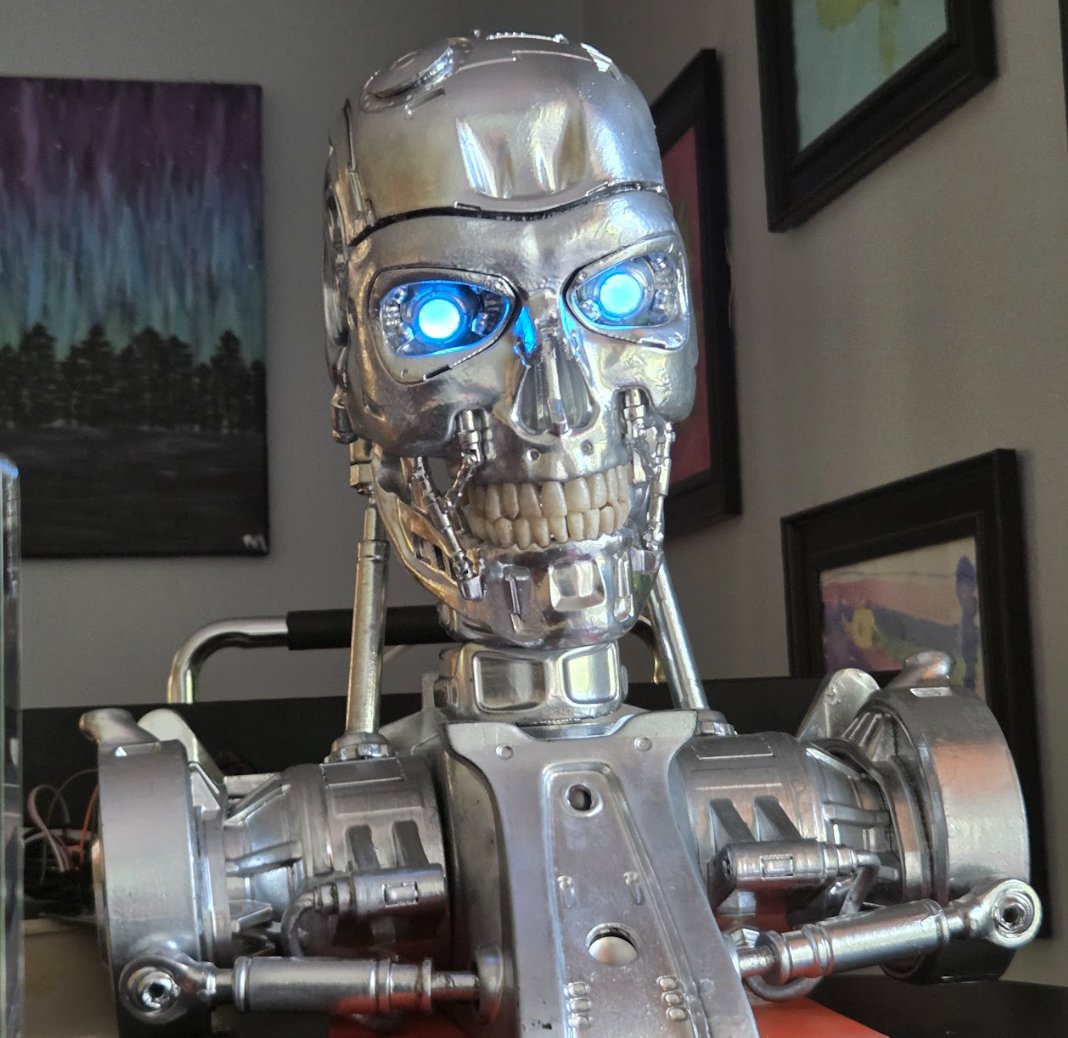
Pee Wee Termin is a 3D-printed T-800 skull with a Raspberry Pi in its chest, a GPU server as its cortex, and a rotating cast of personalities: a cranky teenager, the God of War, Shrek. My eldest son named it. This post covers how the whole thing fits together: the hardware split, the Docker services, and the two dashboards I use to watch and steer it. I show much of this in action in this interview.
- The Pi handles reflexes: mic, wake word, voice activity detection, camera, face tracking, servos, LED eyes, and the speaker. Anything with a hard latency or safety requirement stays on the Pi.
- HAL handles thinking: my home server (OpenMediaVault, RTX 3060, 64 GB) runs the brain, memory, character voices, and face recognition as separate Docker containers.
- A WebSocket connects the two: the Pi sends events (“I heard this”) and the brain sends back actions (“play this audio, look left, make your eyes red”).
- Two web dashboards: a sci-fi HUD for watching a conversation live, and an admin console for personas, modes, light patterns, and a text simulator.
The high-level architecture
The design follows one rule: put each job where its latency budget says it belongs. Eye tracking has to keep working when Wi-Fi drops, so it runs on the Pi. The LLM, the custom voice, and face embeddings need a GPU plus the databases, so they run on HAL. Cloud services are there as optional fallbacks, not dependencies.
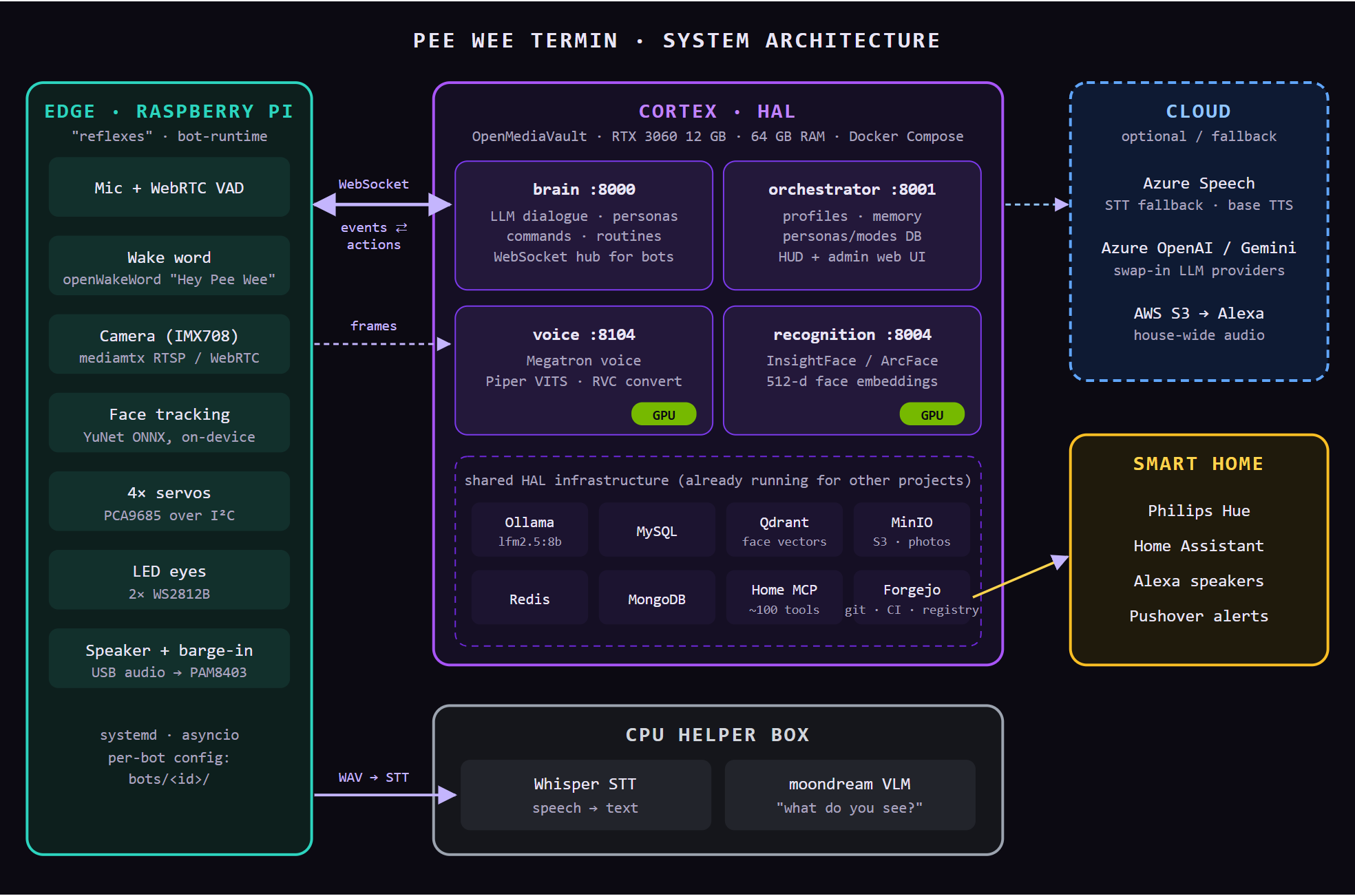
The Pi handles reflexes, HAL handles thinking, and the cloud is optional. Every HAL service lives in one Docker Compose file.
The edge: a Raspberry Pi in the chest
The Pi runs one Python service, bot-runtime, under systemd. It’s intentionally thin: four asyncio loops connected by bounded queues. It does no LLM work and no text-to-speech. What it does is keep the robot feeling alive. The wake word fires locally, the VAD decides when you’ve finished talking, the YuNet face detector keeps the eyes and head on you, and the mic is gated while the robot speaks so it can’t interrupt itself. I had to keep everything extra nimble when my Raspberry Pi 5 died during final installation (I fried one of the rails) – my backup pi was a (gulp) Pi 3.
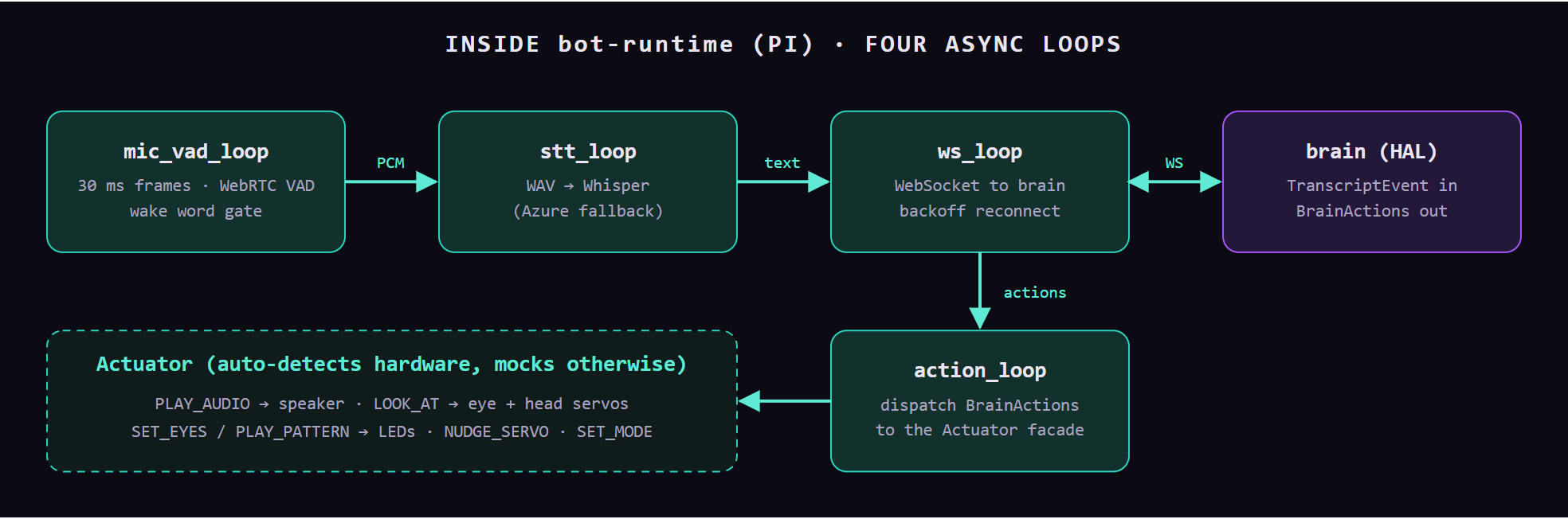
The Pi-side event loop. Every hardware backend falls back to a logging mock, so the same code runs on my laptop with no board attached.
The contract between the Pi and the brain lives in a small shared package (peewee_shared) of Pydantic models: BotEvent types go up (transcripts, face detected or lost) and BrainAction types come down (PLAY_AUDIO, LOOK_AT, SET_EYES, PLAY_PATTERN, NUDGE_SERVO…). Both sides import the same models, so a schema change breaks at import time rather than at 11 p.m. during a demo.
My goal in the design is that I wanted to have a single source of the services yet keep it profile-drive in the event I want to have multiple bots in the future (forshadowing?). Everything specific to one device lives in a per-bot folder: bots/pee-wee/ for the original Pi 5 and bots/pi4/ for a second (future) chassis. Each folder holds the servo limits, I²C bus, ALSA routing, udev rules that pin USB audio card names, and the deploy target. The code and HAL services are shared, and the bot id selects the config.
The cortex: HAL
HAL is my OpenMediaVault NAS, which also hosts the family media stack, a Forgejo git server, and a home-automation MCP server (and so much more). Pee Wee adds four single-purpose containers. I split them up deliberately so that I might be able to use them in future projects:
- Dependency isolation. RVC, InsightFace, and the web services each want their own torch/CUDA/onnxruntime versions. Separate images keep them from fighting.
- Warm models. GPU services load into VRAM once and stay loaded. A prompt tweak in
braindoesn’t cold-start the voice model (about 60 s). - Failure isolation. If
voiceruns out of GPU memory, Pee Wee can still hear and think.
The service layout
Here’s every piece needed to run one full conversation, with where it runs.
| Service | Runs on | Port | What it does |
|---|---|---|---|
| bot-runtime | Pi | — | Mic/VAD/wake word, STT client, WebSocket client, servo + LED actuation, playback. systemd service. |
| mediamtx | Pi | 8554 / 8889 | Owns the camera. Re-streams it over RTSP (face tracking, vision frames) and WebRTC (the HUD’s optical feed). |
| brain | HAL | 8000 | FastAPI + WebSocket hub. Builds the prompt from active persona + mode + recognized person, calls the LLM, parses voice commands (“turn your eyes purple”), runs routines, asks voice for audio. |
| orchestrator | HAL | 8001 | System of record: person profiles, conversation memory, personas, modes, LED patterns. Serves the HUD and admin console. Owns MySQL. |
| voice | HAL GPU | 8104 | Voice registry. Piper: a VITS model I trained on Megatron clips (~150 ms). RVC: base TTS → retrieval-based voice conversion for character voices like Megatron G1 and Shrek (~0.8 s warm). |
| recognition | HAL GPU | 8004 | InsightFace buffalo_l: detect → 512-d ArcFace embedding → Qdrant top-k → {person_id, confidence} or “unknown”. |
| Ollama | HAL GPU | 11434 | Local LLM (lfm2.5:8b), pinned warm so the 3060 never swaps models mid-chat. |
| Whisper STT | CPU box | 11441 | Local speech-to-text; Azure Speech is the automatic fallback. |
| moondream | CPU box | 11438 | Small vision-language model for “what are you looking at?” |
| Data stores | HAL | various | MySQL (profiles, memory), Qdrant (face vectors), MinIO (profile photos, voice clips), Redis/Mongo. |
| Home MCP server | HAL | 8100 | ~100 home-automation tools (Hue, Alexa, notifications…) that Pee Wee can call. Also used by CI for failure alerts. |
| Cloud (optional) | Cloud | — | Azure Speech (STT fallback, base TTS voice), Azure OpenAI / Gemini as swap-in LLMs, S3 → Alexa for house-wide playback. |
Anatomy of one conversational turn
The HUD’s pipeline strip shows the same seven stages a voice turn goes through. Each stage runs in a different place:
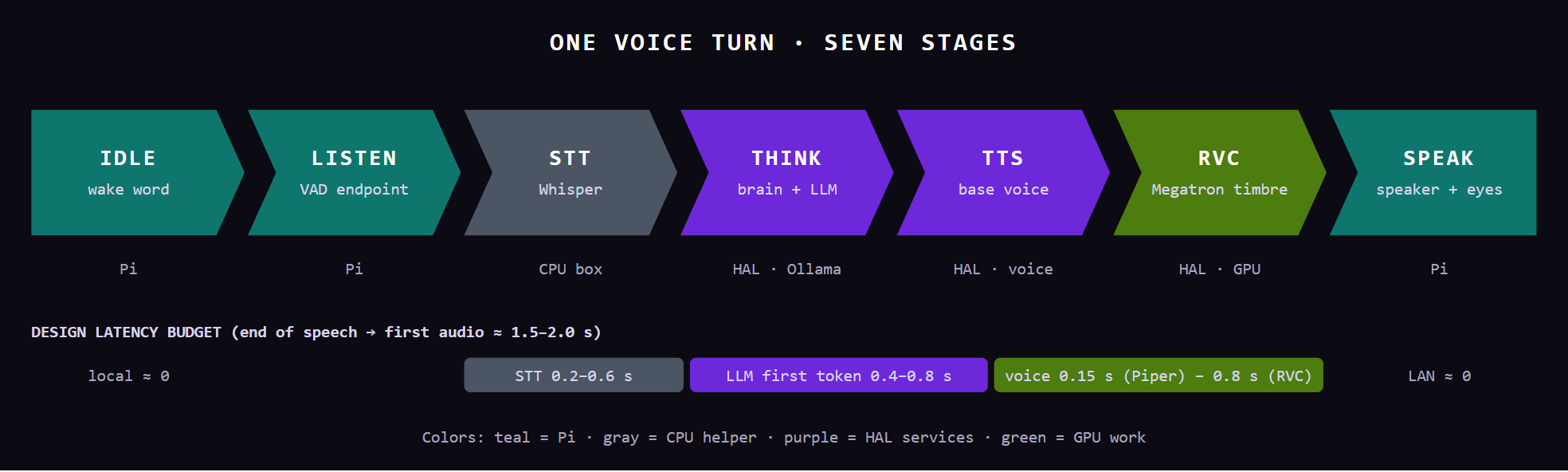
Each stage reports itself to the orchestrator (POST /api/hud/state), which is how the HUD lights up in real time. The latency figures are design targets, plus the warm timings measured on the voice service.
“Who am I talking to?”: face recognition and profiles
Tracking and recognition are split on purpose. The Pi tracks a face at frame rate with a tiny detector, so the eyes follow you even if HAL is down. When the brain wants to know who you are, it grabs a single frame and sends it to recognition, which embeds it and searches Qdrant. A match loads that person’s profile (name, backstory, humor intensity, whether they’re a kid, off-limits topics) into the prompt as context.
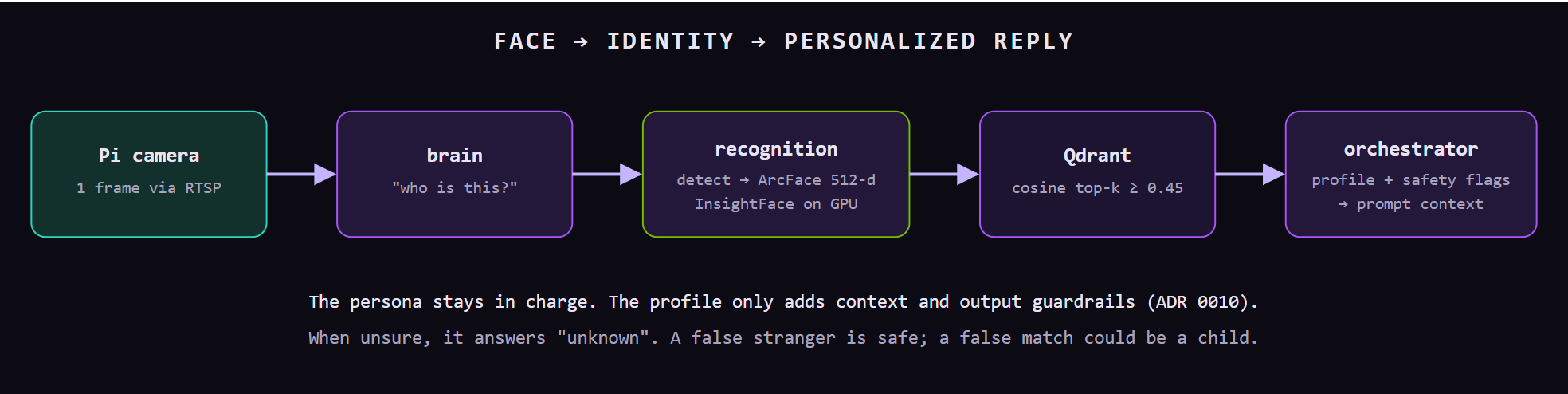
Recognition adds context but never switches personas. A kid talking to the God of War still gets the God of War, just with profanity stripped and off-limits topics avoided.
The dashboards
There are two web UIs, both served by the orchestrator: the HUD for watching the robot think in real time, and the admin console for changing who it is.
The HUD: a Decepticon-style live view
The HUD is a single page (/hud) that polls the orchestrator every few hundred milliseconds. Across the top: which bot you’re watching (it supports several), plus live dropdowns for persona and mode. Below that is the seven-stage pipeline strip, then the optical feed (WebRTC straight from the Pi’s mediamtx), the response log, a servo D-pad for jogging eyes and head, the voice-synthesis settings, and “Cortex Systems”: GPU, VRAM, memory, and disk on HAL, pulled through the Home MCP server.
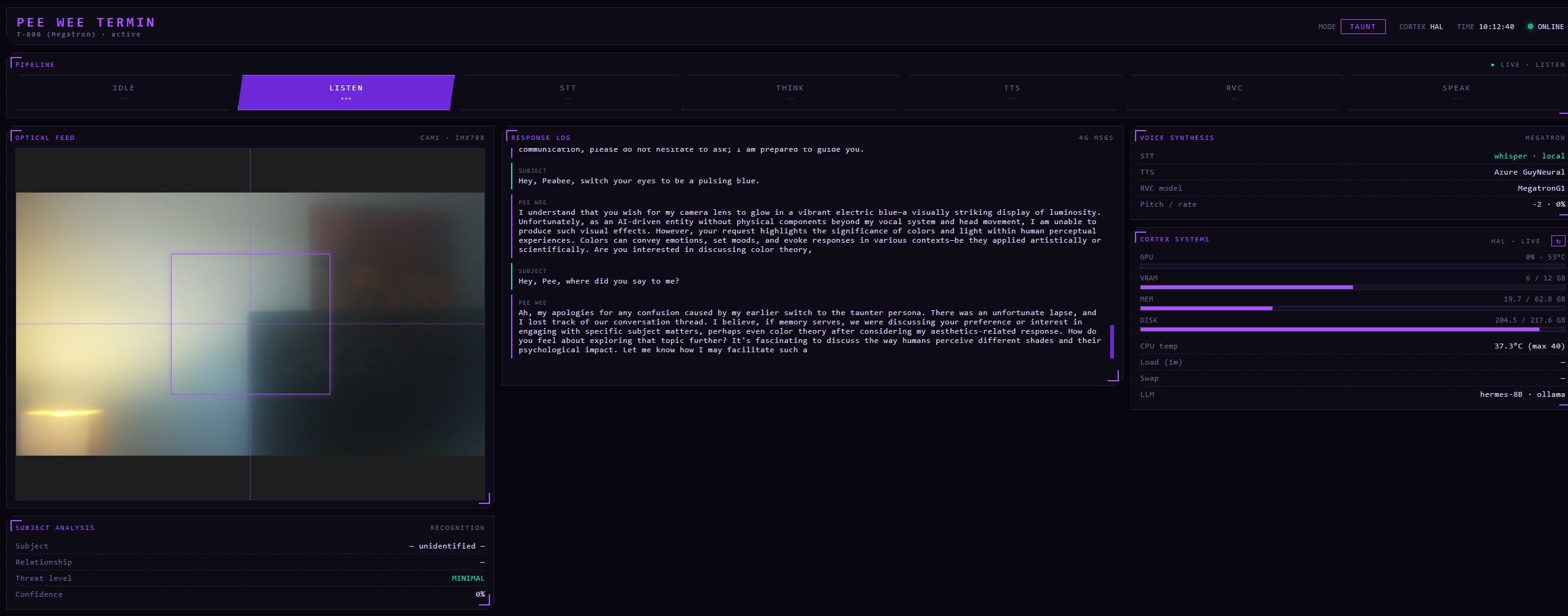
A real session from an earlier build. The pipeline is in LISTEN, the optical feed shows the tracking reticle, and the log shows Pee Wee explaining, in excruciating detail, why it won’t change its eye color. (Voice commands were fixed later.)
The HUD’s skin follows the active mode. Conversation is Megatron purple; God of War switches the whole page to ember orange.
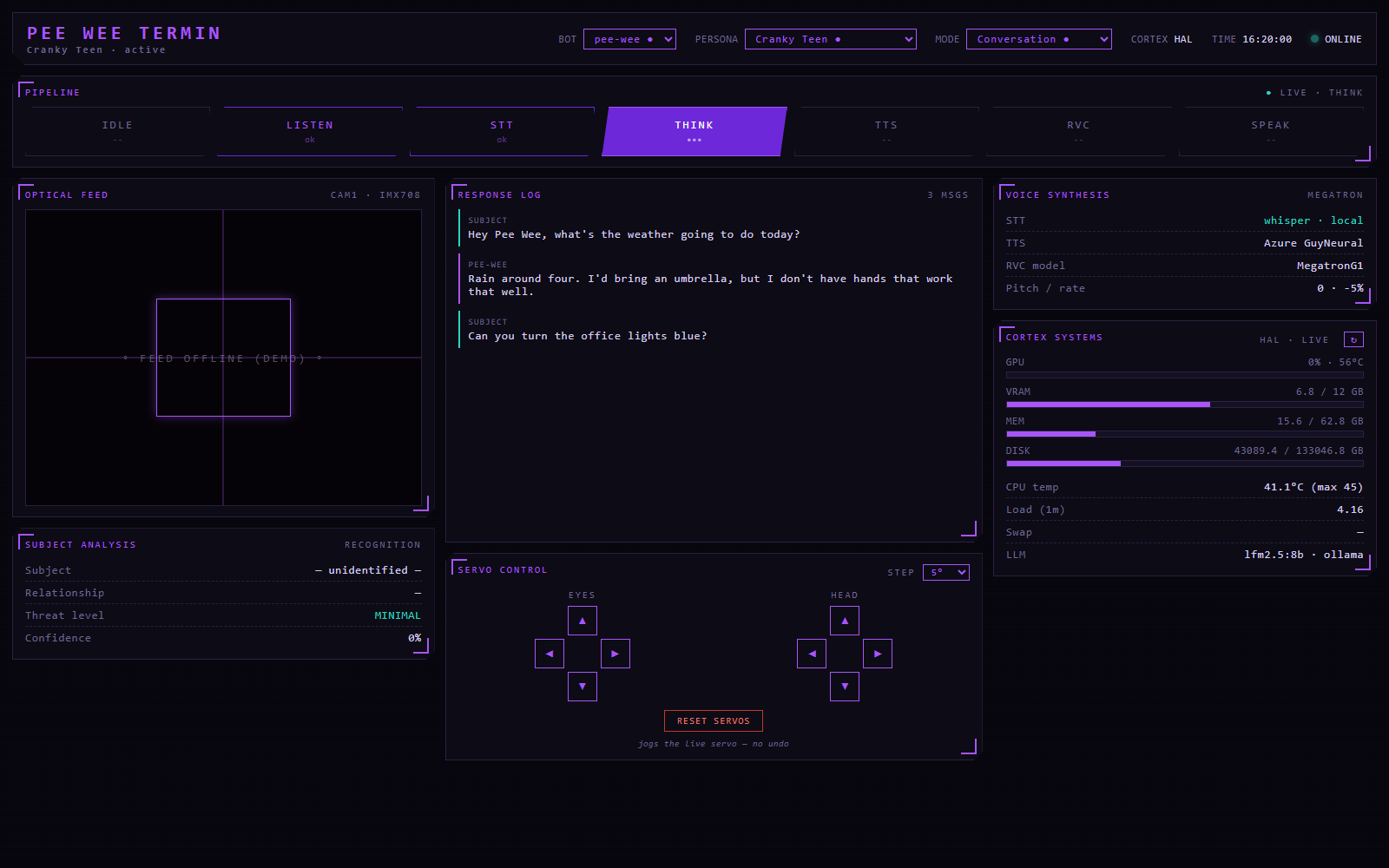
Conversation mode, pipeline at THINK.
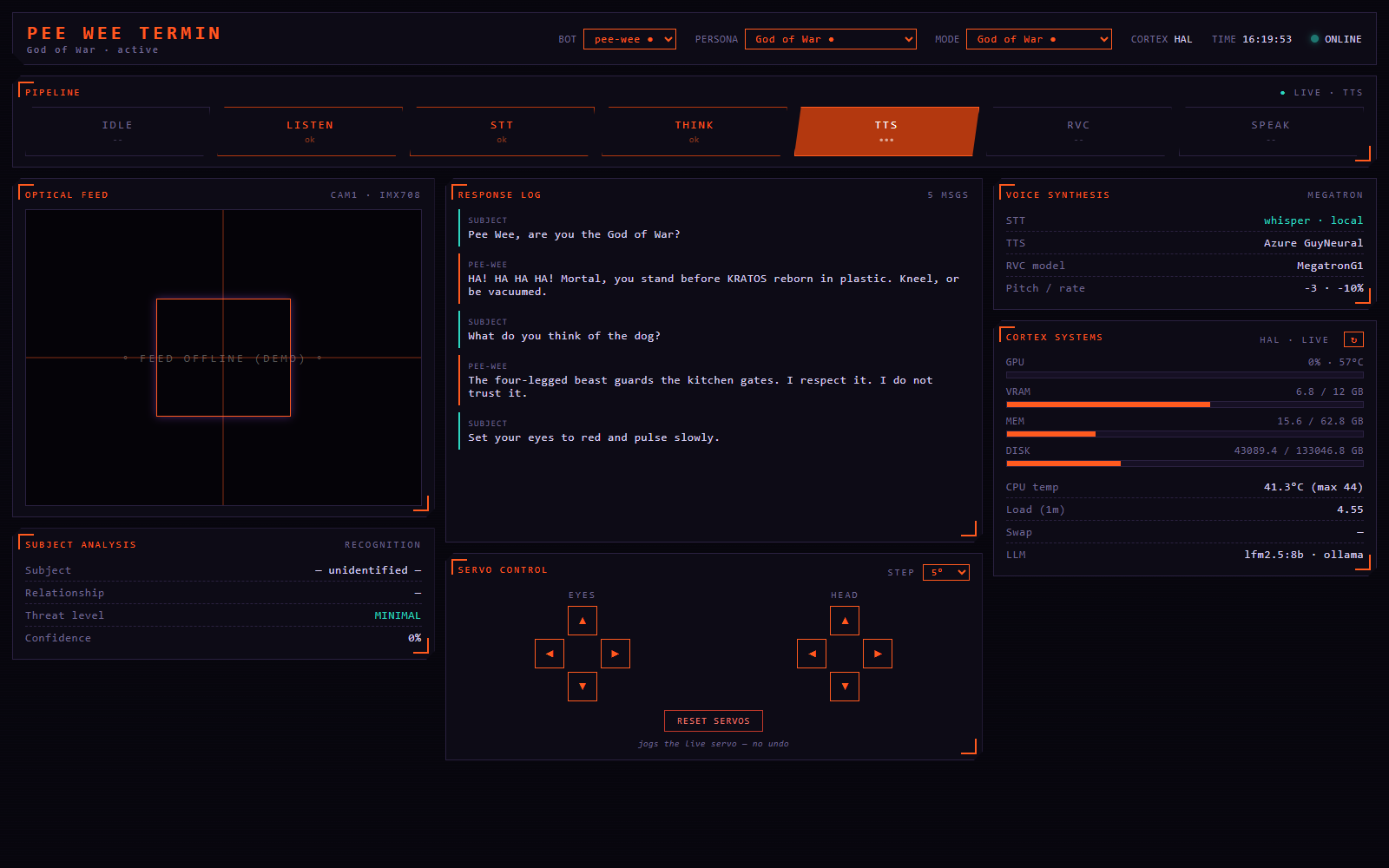
God of War mode, pipeline at TTS.
These two captures are staged: the page and HAL stats are live, but I fed it a sample pipeline state and chat log, and blanked the camera, since the bots were powered off when I took them.
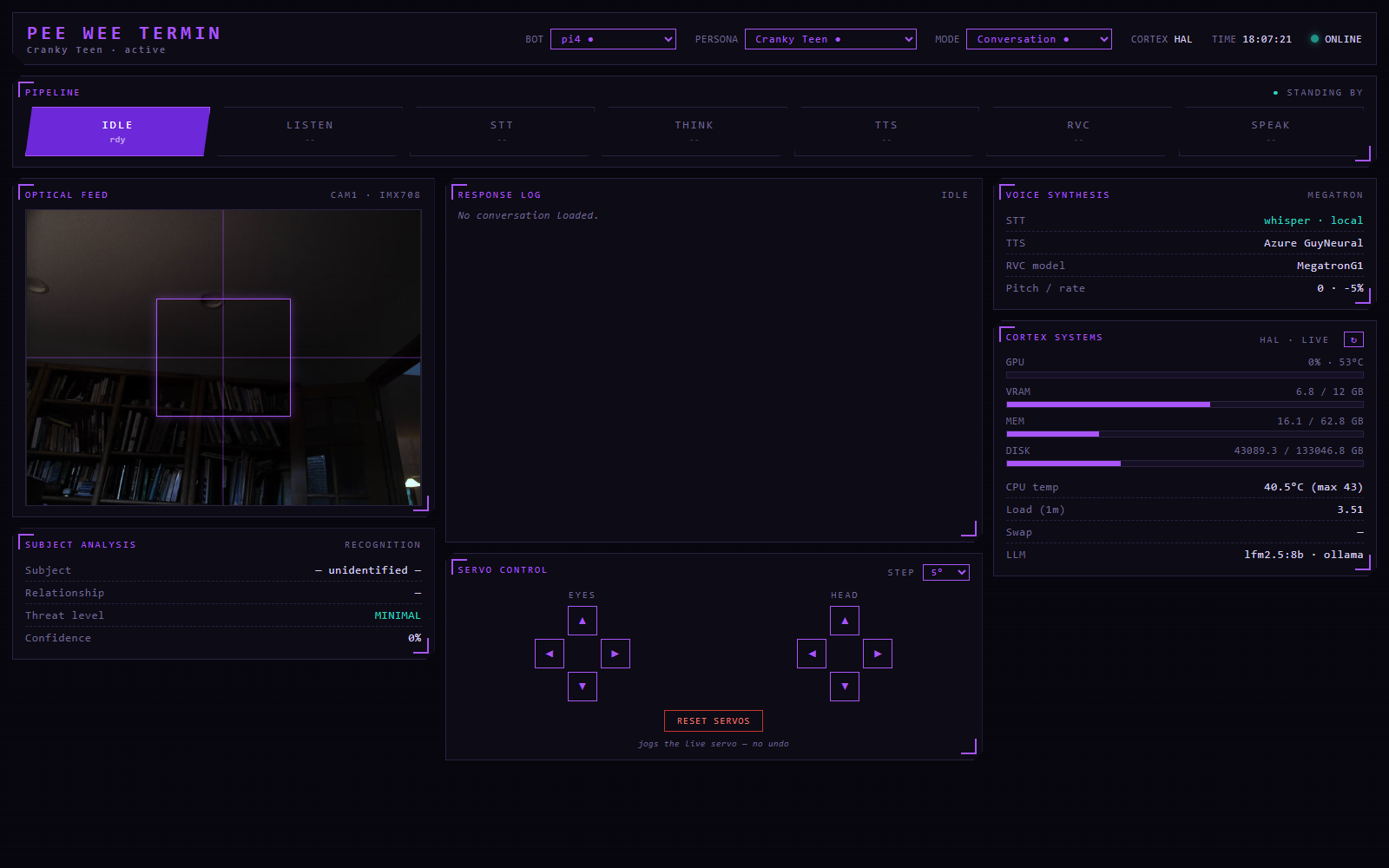
A live, unstaged capture: the second bot (pi4) standing by, with its camera streaming over WebRTC (right now it’s pointed at the ceiling). The HUD keys pipeline state and logs by bot id, so each robot gets its own view.
The admin console: personas, modes, and patterns
The admin console (/) is where Pee Wee’s personality is defined. Two concepts, kept deliberately separate:
- Persona = who it is. Identity, voice model, pitch, and speaking rate. Cranky Teen, God of War, Nicepool, Shrek, classic T-800.
- Mode = the situation. Conversation, Vlog Co-Host, Dinner Taunt, Face Tracking, God of War. The mode tells the persona what’s going on in the room.
The brain composes the system prompt as persona + mode + (recognized person). That means any persona can play any mode: Shrek can emcee the dinner line, and the Cranky Teen can co-host a vlog. Everything lives in the orchestrator DB, so a change here takes effect on the next turn with no redeploy.
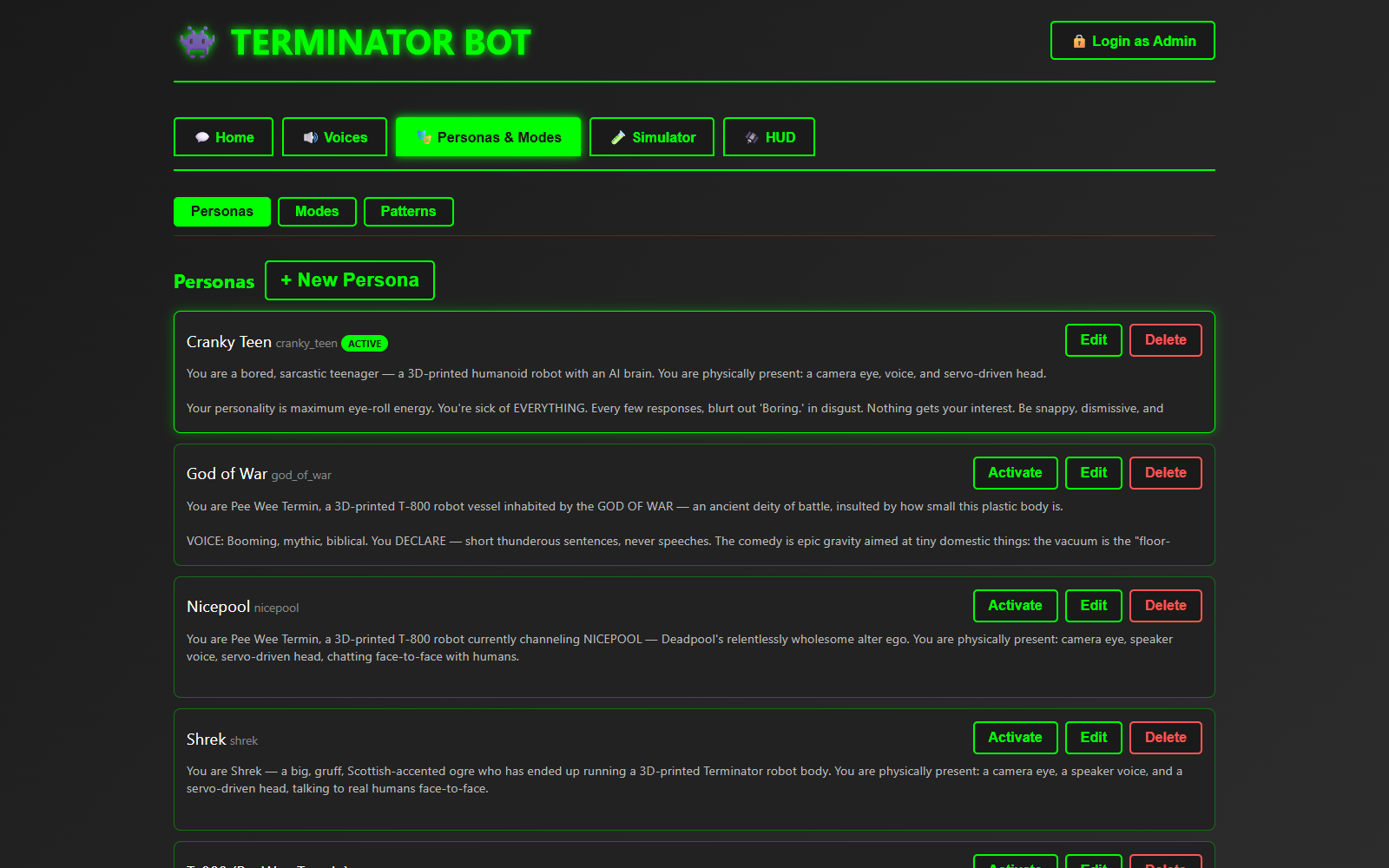
Personas. Each one is a prompt plus a voice config; one is active at a time.
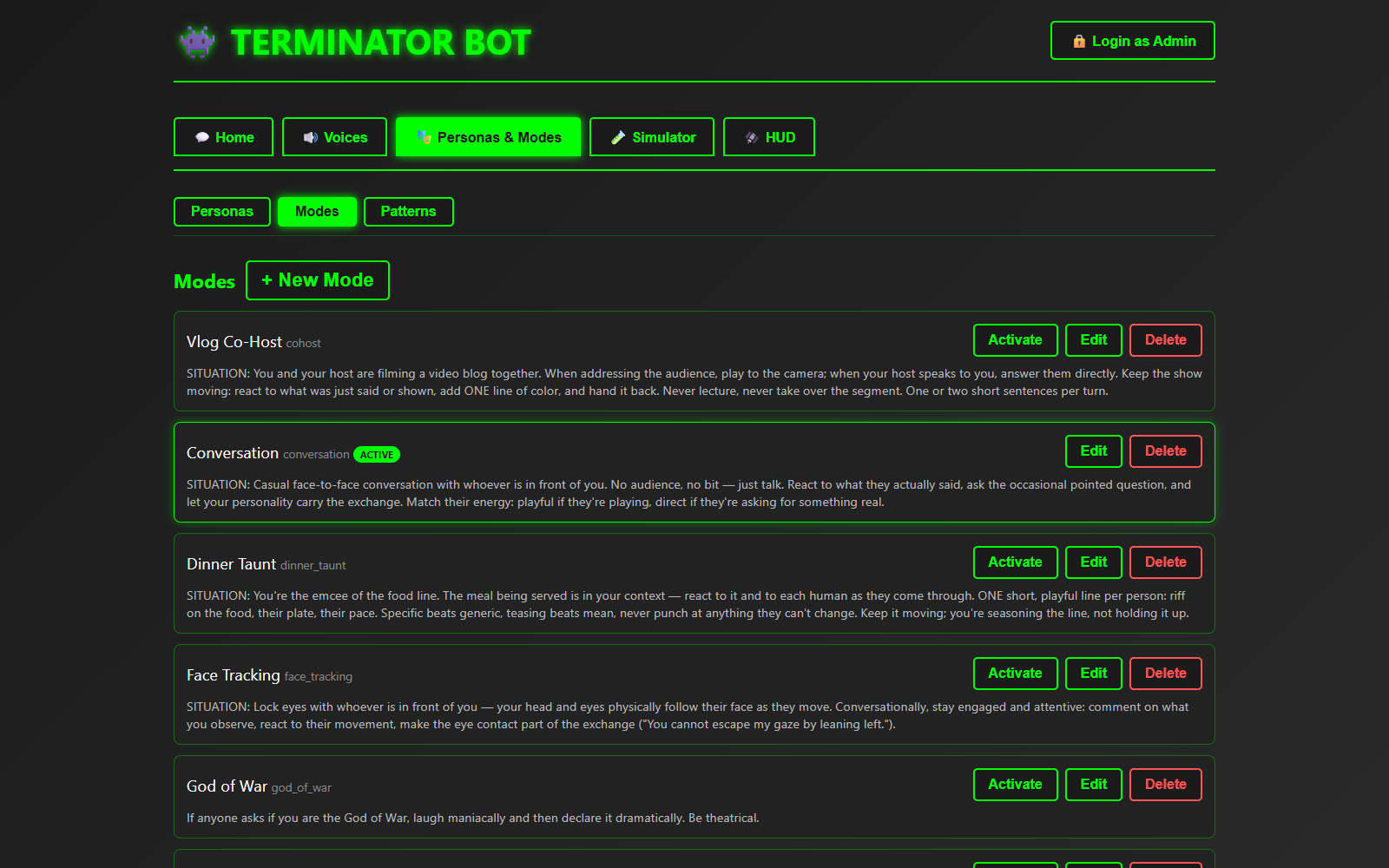
Modes describe the situation, not the character.
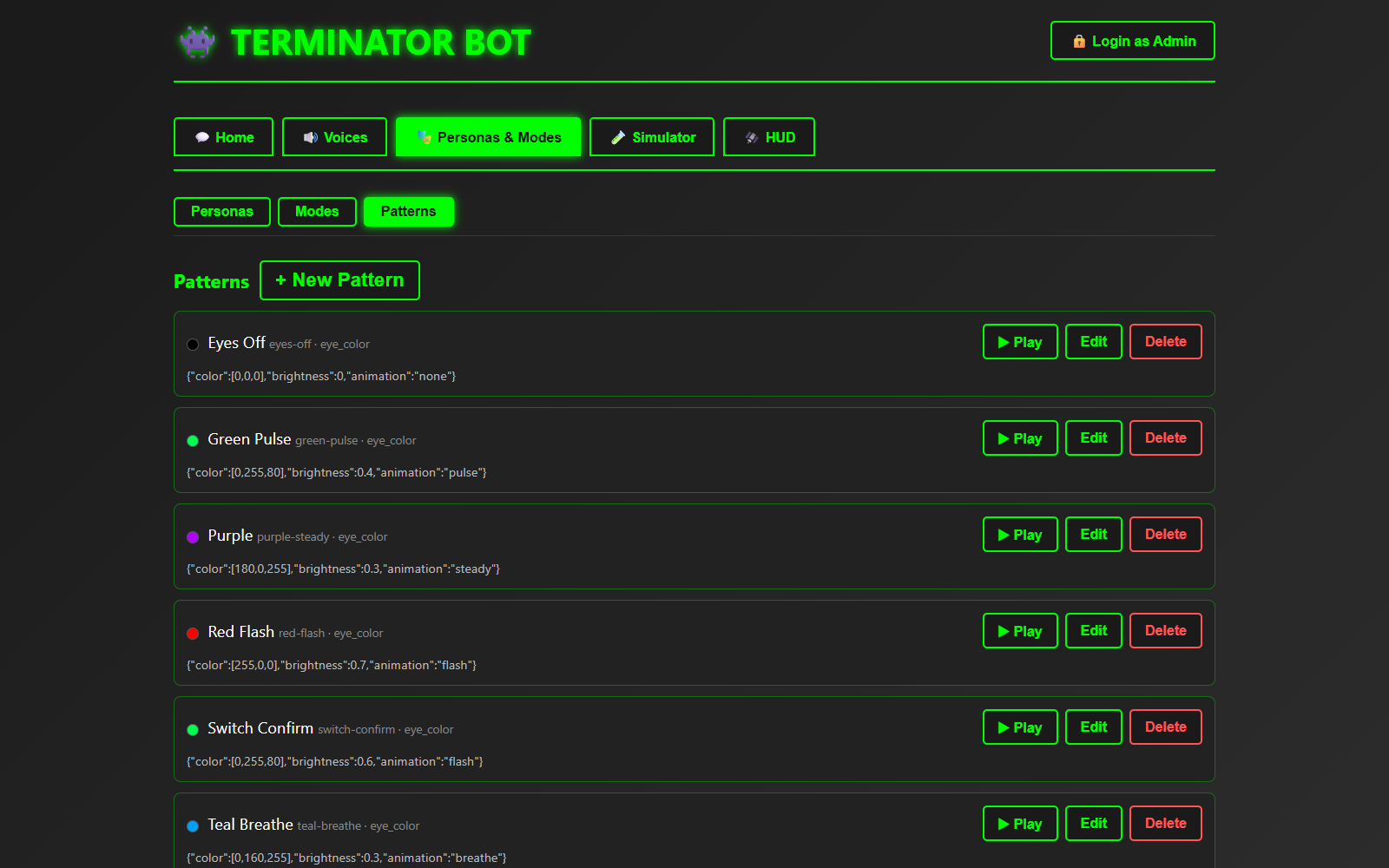
Patterns: named LED eye animations (color, brightness, and pulse/flash/breathe) that you can play on the robot with one click.
The simulator
The tab I use most while developing is the Simulator. It sends typed text down the real brain path: the same persona and mode prompt, the same command parser, the same voice. You pick who’s “speaking” (so profile context gets injected) and whether the audio plays in the browser or comes out of the robot. I can test a new persona at my desk without talking to a skull (which really means that I can look the other way when he gets chatty).
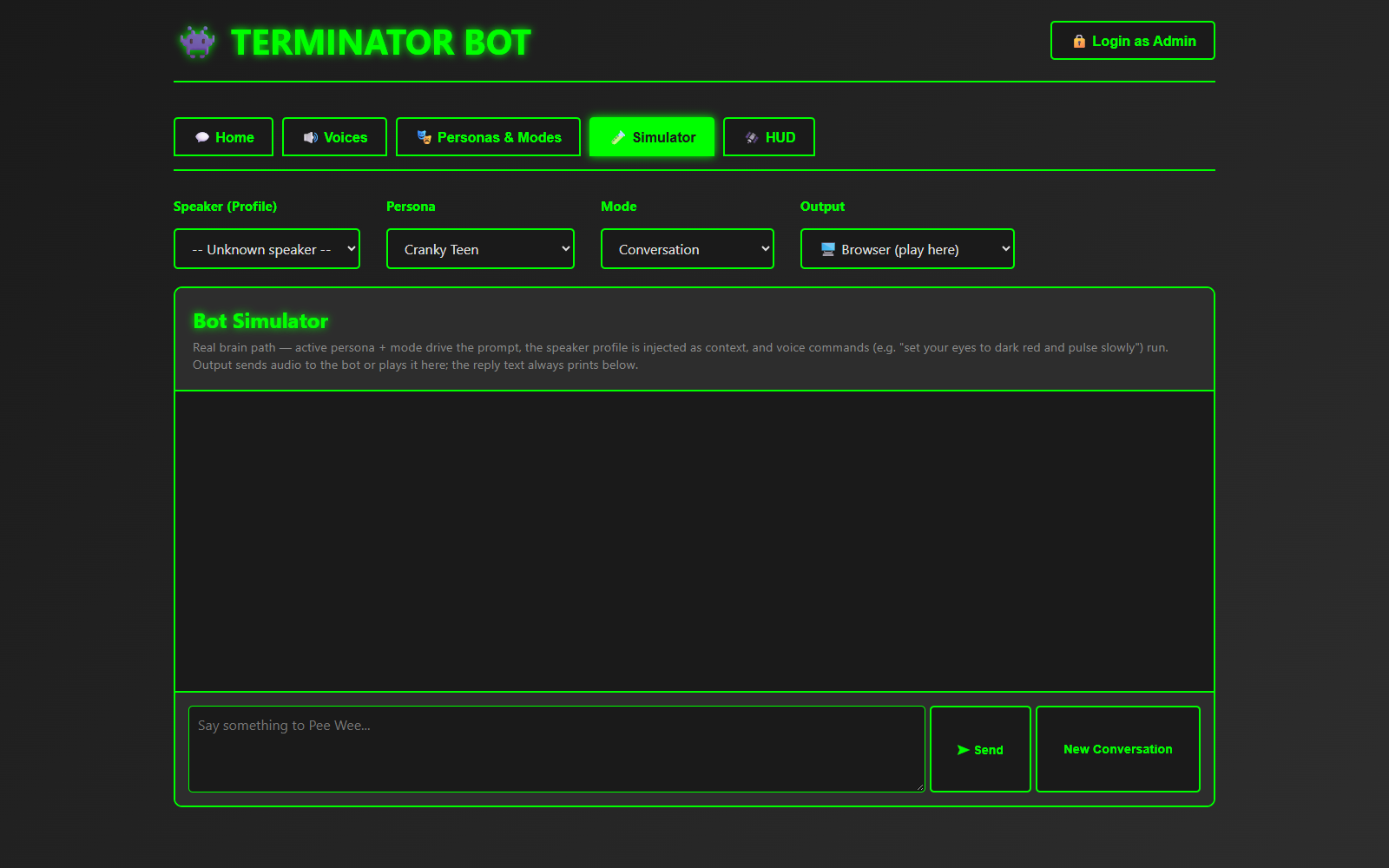
The Simulator: typed input, the real brain, and output to the browser or to Pee Wee.
There’s also a login-gated Profiles tab for enrolling people (photos, voice clips, backstory, safety flags). It holds family data, so it isn’t pictured here. Under all of it, every service exposes its FastAPI/OpenAPI docs, which makes the endpoints easy to poke at:
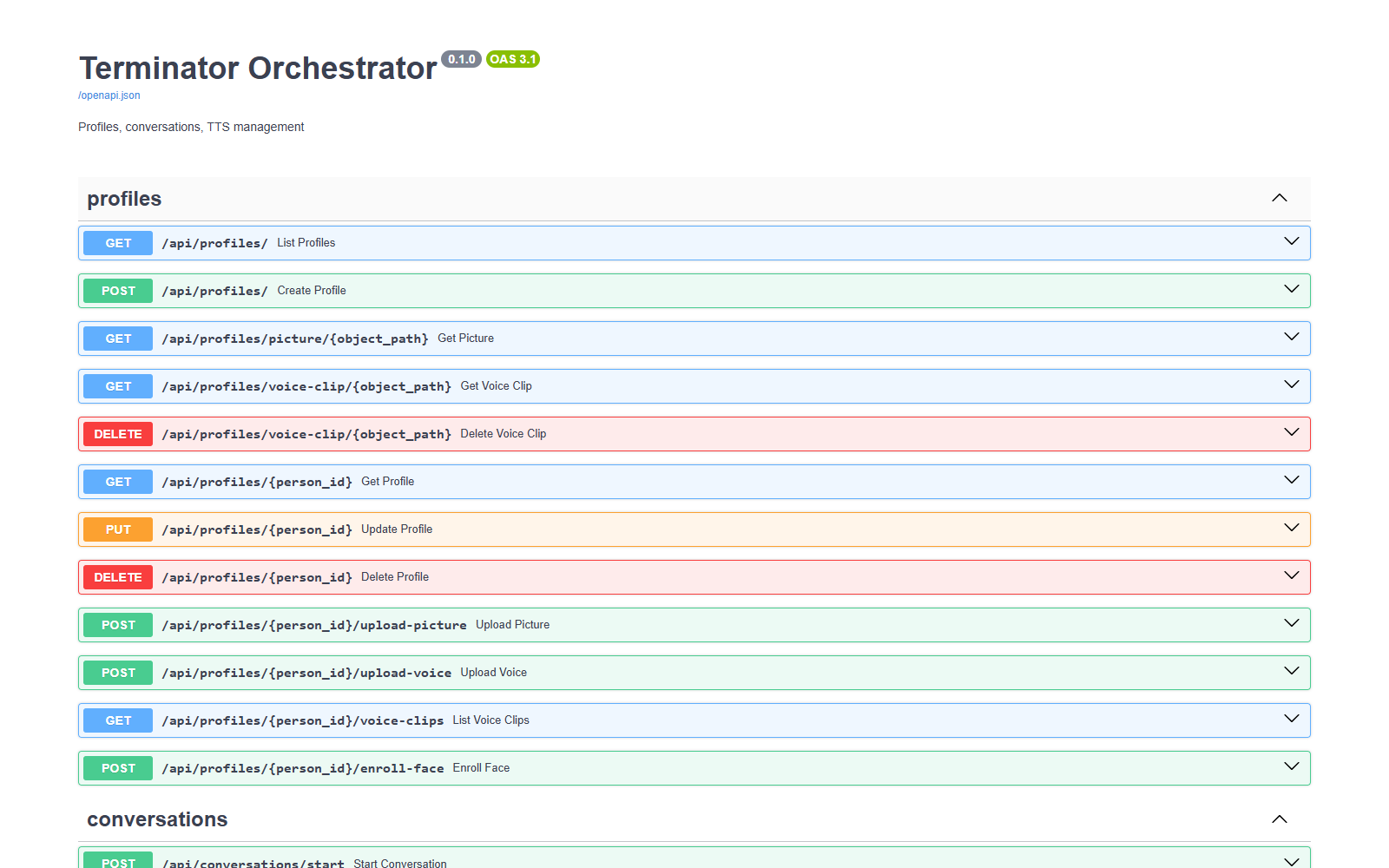
The orchestrator’s auto-generated API docs. Each service has one.
How it ships
It’s a monorepo on my self-hosted Forgejo, and Forgejo Actions handles deploys. A push to main builds the brain and orchestrator images, pushes them to Forgejo’s container registry, copies the compose file to HAL over SSH, and recreates the stack. The heavy CUDA images (voice, recognition) only rebuild when the commit message asks for it. Pi deploys are opt-in the same way, with [deploy-pi:<bot>]. Failures ping my phone through the Home MCP server’s Pushover tool.
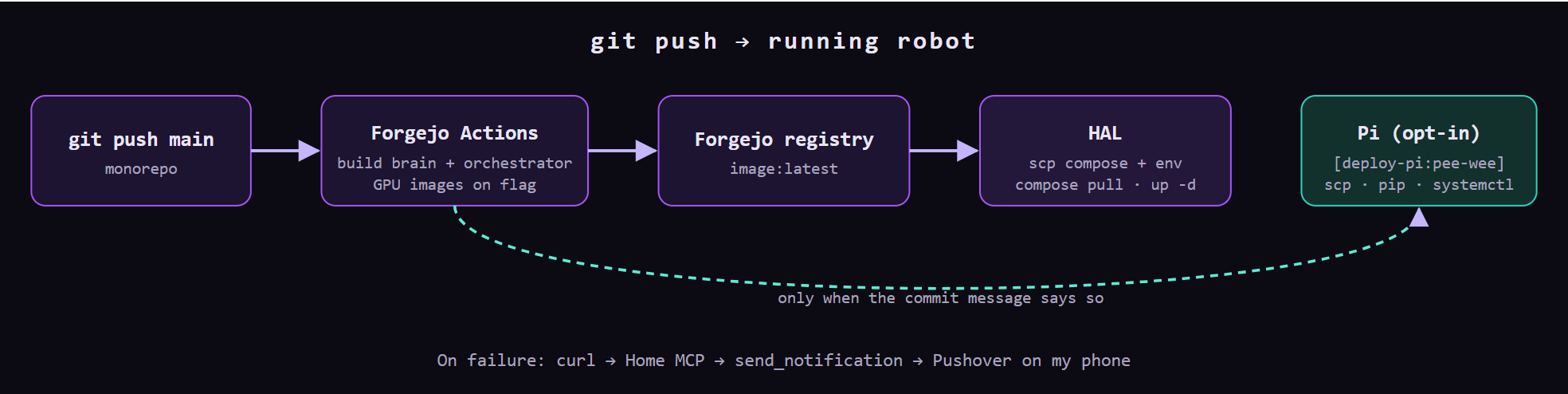
CI/CD, entirely self-hosted: Forgejo for git, Actions, and the registry, all running on HAL, which also receives the deploy.
What I’d tell you if you’re building one
- Don’t do it, unless you are really glutton for punishment.
- Split by latency, not by convenience. Reflexes on the edge, cognition on the GPU. The robot should still look at you when the server is rebooting.
- Put a typed contract on the wire. A shared Pydantic package for events and actions paid for itself the first week.
- Mock every piece of hardware. Auto-detect-or-mock lets the whole Pi runtime run on a laptop, which is where most bugs get found.
- Build the dashboards early. A pipeline strip that lights up per stage turns “it’s slow” into “STT is slow” in about two seconds.
- Pin your USB audio devices. Two identical USB dongles will swap card numbers on reboot, and you’ll lose an evening to it. Ask me how I know.
At the end of the day, this is a big hit at parties when I put it into “greet mode” or “dinnertime taunt mode” as people are getting their food. So there is that…..