Building a local RAG pipeline over my Obsidian vault, and why keyword search almost didn’t work
In my last post I described my “home brain”: an Obsidian vault that my automations keep filled with facts about my house, my servers and my projects. I ended with a promise. Because the vault is plain Markdown, I should be able to ask it questions and get answers drawn from my own notes, with citations, without anything leaving the house.
This post is about building that. It works. But the interesting part isn’t that it works. It’s the handful of places where the obvious approach quietly failed, and one in particular: keyword search, the oldest and most boring search technique there is, which turned out to be both essential and broken in a way I didn’t expect.
The goal
I wanted three things:
- Ask in plain English. “What does the Kodi maintenance workflow do?” should just work.
- Find exact values. Questions about a specific port, container name or ID should find the note that contains it.
- Show its work. Every answer should cite the notes it used, and I should be able to see why those notes were picked.
And it all had to run locally: my own server, my own database, my own small AI models (on my beloved HAL).
How RAG works, in one picture
RAG stands for retrieval-augmented generation. Instead of asking an AI model to answer from whatever it absorbed in training, you first retrieve the few passages from your own documents that are most relevant, then ask the model to answer using only those. The model does the writing; your notes supply the facts.
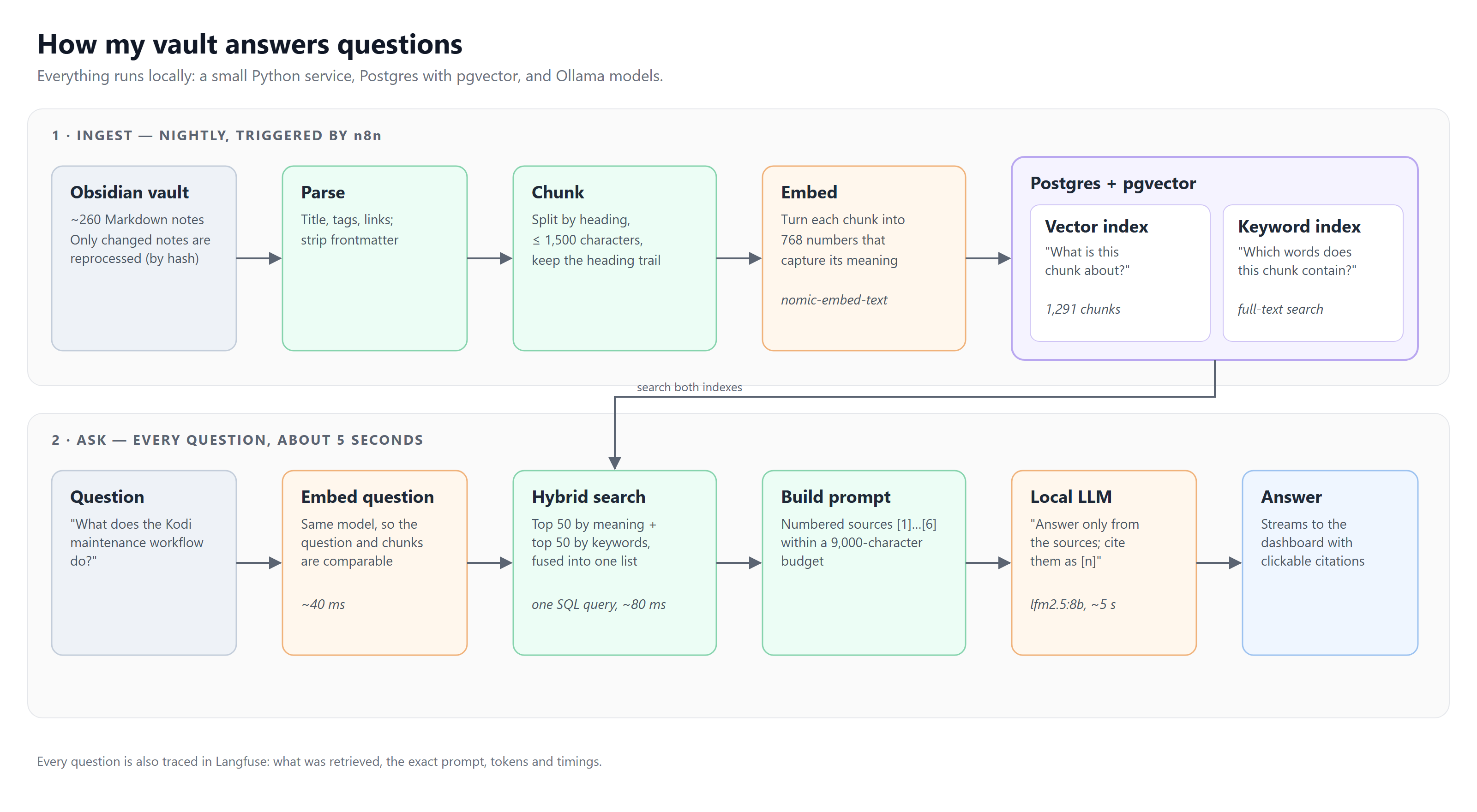
There are two halves:
- Ingest (nightly). An n8n flow calls the service at 3 a.m. It reads the vault, cuts each note into chunks, turns each chunk into an embedding (a list of 768 numbers that captures its meaning) and stores everything in Postgres. Only notes whose contents changed since last time are reprocessed.
- Ask (every question). The question is embedded the same way, the database finds the most relevant chunks, and a local language model writes an answer from them, citing each source as [1], [2] and so on.
The whole thing is one small Python service, one Postgres database with the pgvector extension, and two models served by Ollama: nomic-embed-text for embeddings and lfm2.5:8b for answers. Right now it covers 258 notes split into 1,291 chunks. A typical question takes about six seconds, almost all of it the model writing.
Simple enough on a whiteboard. Here’s where it got interesting.
Challenge 1: cutting notes into chunks
You can’t hand a model your whole vault, and you shouldn’t search whole notes either. A long note about my server covers storage, Docker, backups and a dozen other things, and a question about backups shouldn’t have to compete with all of that. So notes are cut into chunks, and how you cut them matters more than it sounds.
My first rule was to follow the note’s own headings. People already organize notes into sections that are each about one thing, so the chunker uses them.
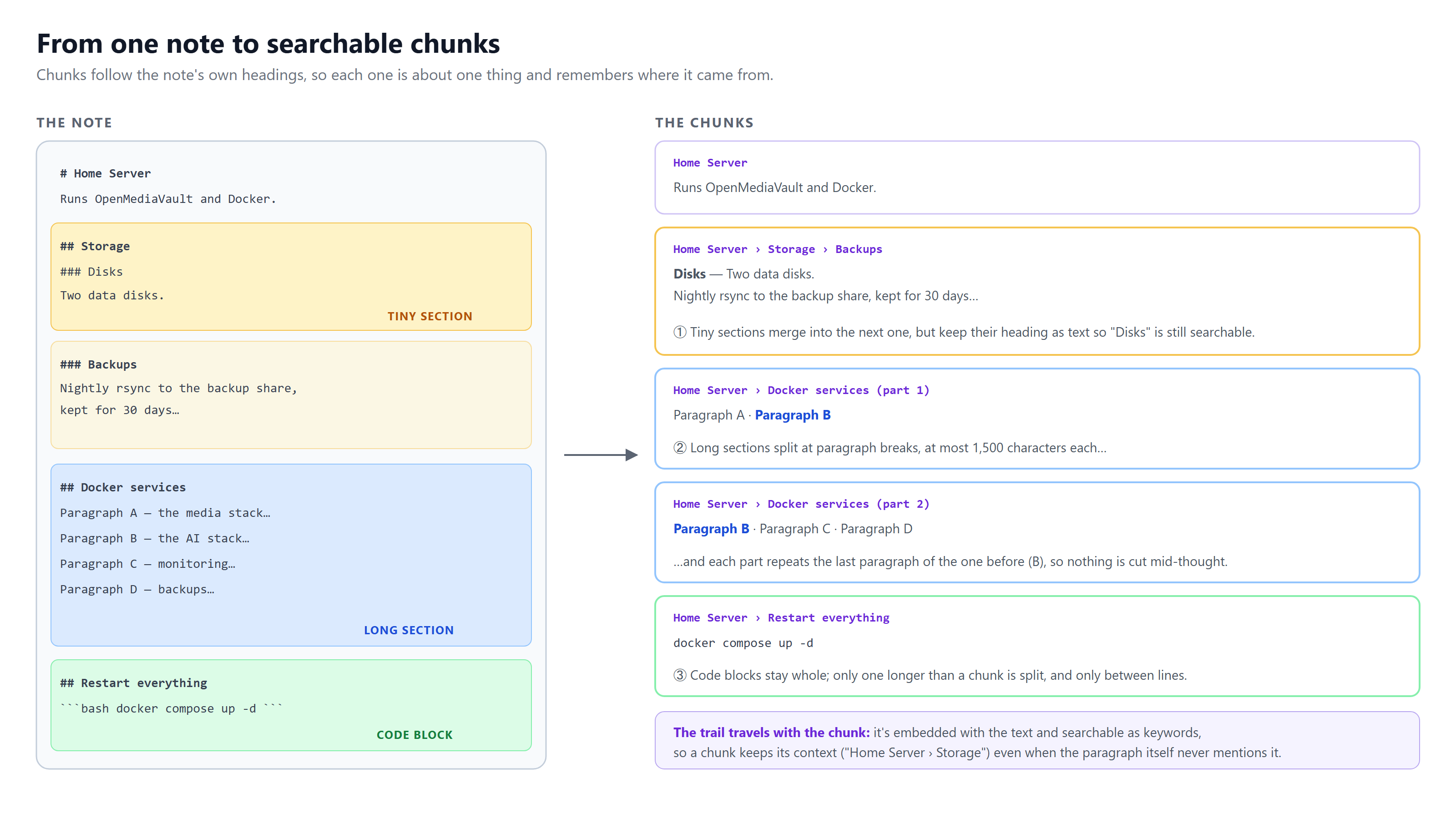
A few details turned out to matter:
- Every chunk remembers where it came from. It carries its heading trail (“Home Server › Storage › Backups”), and the trail is included in both the embedding and the keyword index. A paragraph that just says “kept for 30 days” is useless on its own; with its trail, it’s clearly about server backups.
- Tiny sections are merged into the next one, but their heading is kept as text so it’s still searchable.
- Big sections are split at paragraph breaks, at most 1,500 characters each, and each piece repeats the last paragraph of the previous one so no idea gets cut in half.
- Code blocks stay whole. Half a command is worse than no command. Only a block that’s longer than a whole chunk gets split, and then only between lines.
Challenge 2: two kinds of search, and why you need both
This is the heart of the project.
There are two fundamentally different ways to find relevant text:
- Vector search compares meaning. The question and every chunk become embeddings, and the database finds the chunks whose meaning is closest. You don’t have to use the note’s exact words.
- Keyword search compares words. It’s the classic full-text search that’s been in databases for decades: find chunks that contain the words in the question.
Vector search is the one everyone talks about in RAG, so it’s tempting to use it alone. I tested that against my own vault, and each method turned out to be blind in a different place.
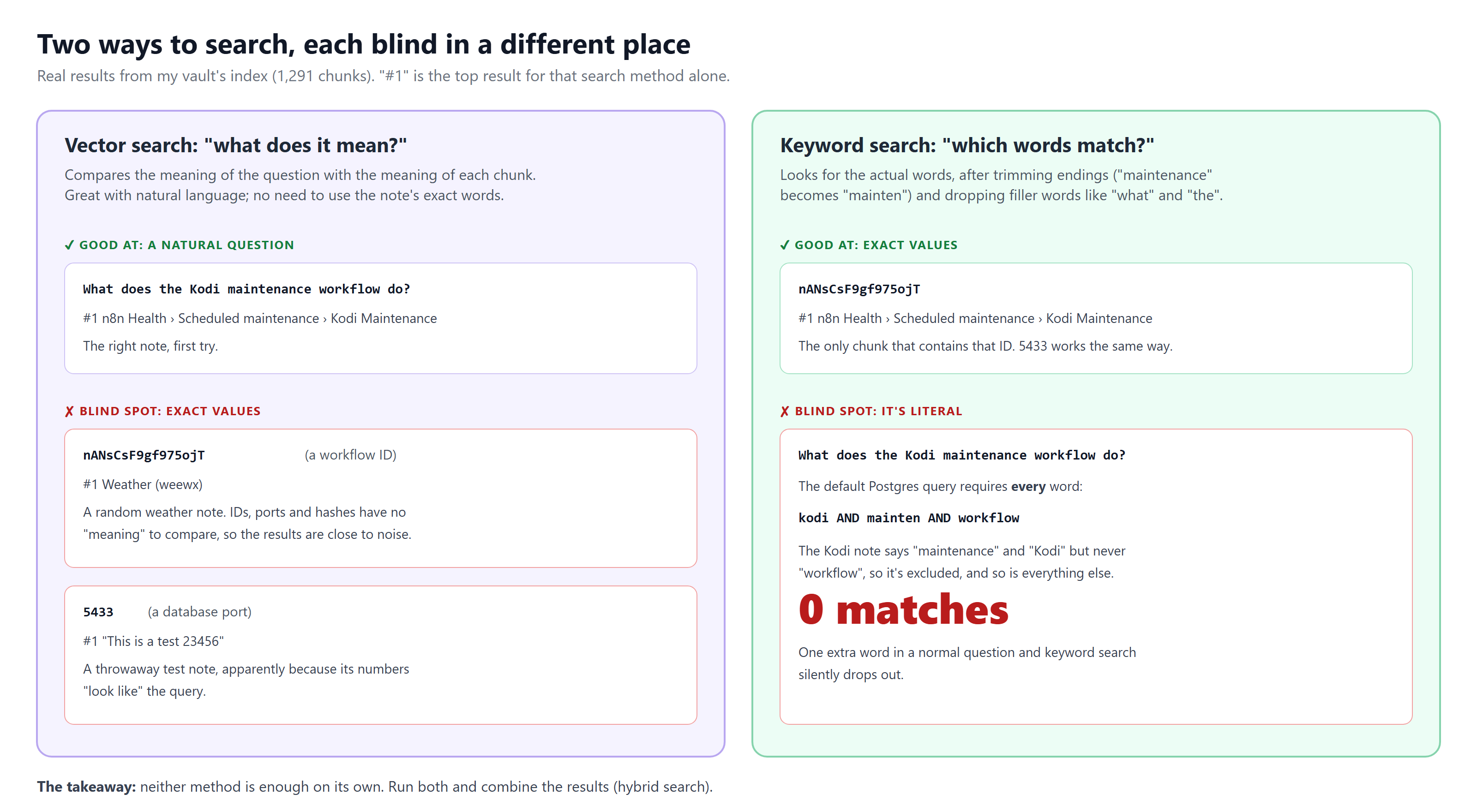
Vector search fails on exact values. When I searched for a workflow ID, nANsCsF9gf975ojT, vector search’s top result was a note about my weather station. When I searched for a port number, 5433, its top result was an old throwaway note called “This is a test 23456”, apparently because its numbers look similar. IDs, ports and hashes don’t have meaning the way sentences do, so comparing meanings produces something close to noise. In a homelab vault, exact values are exactly what you look things up for.
Keyword search finds exact values instantly. The same ID search returns the one chunk that contains it. So the design is hybrid: run both searches in a single database query and combine the results.
That part I had planned from the start. What I hadn’t planned for was keyword search quietly contributing almost nothing.
The AND trap
Postgres has good built-in full-text search. You give it a question, and it:
- drops filler words (“what”, “does”, “the”),
- trims words to their root (“maintenance” becomes “mainten”),
- and looks for chunks containing the remaining words.
The catch is in step 3. By default it looks for chunks containing all of them. It joins the words with AND.
That’s fine when you type two keywords into a search box. It’s a disaster for natural questions. Take “What does the Kodi maintenance workflow do?” Postgres keeps three words: kodi, mainten and workflow. The note that actually answers it is the status note for my Kodi maintenance flow, and it contains “Kodi” and “maintenance” but never the word “workflow”. One extra word in a normal question, and the right answer is excluded. So is every other chunk in the vault.
Zero matches. Keyword search silently drops out, and the whole answer rests on vector search alone, which is precisely the method that can’t be trusted with exact values. Every extra word in a question is one more condition a chunk has to meet, so the more naturally you phrase it, the worse it gets.
Nothing errored. Answers still came back, because vector search picked up the slack. That’s what made it easy to miss.
The fix: any word counts, rare words count more
The fix has two parts.
First, match any of the words instead of all of them (OR instead of AND). That same question now matches 233 chunks instead of zero.
But 233 chunks is a lot, and most of them only mention “workflow”, which appears all over my vault. So the second part is to weight each word by how rare it is. A word that appears in almost every chunk tells you almost nothing; a word that appears in one chunk tells you a lot. Each word gets a weight of ln(total chunks ÷ chunks containing it), and a chunk’s keyword score is the sum of the weights of the words it contains.
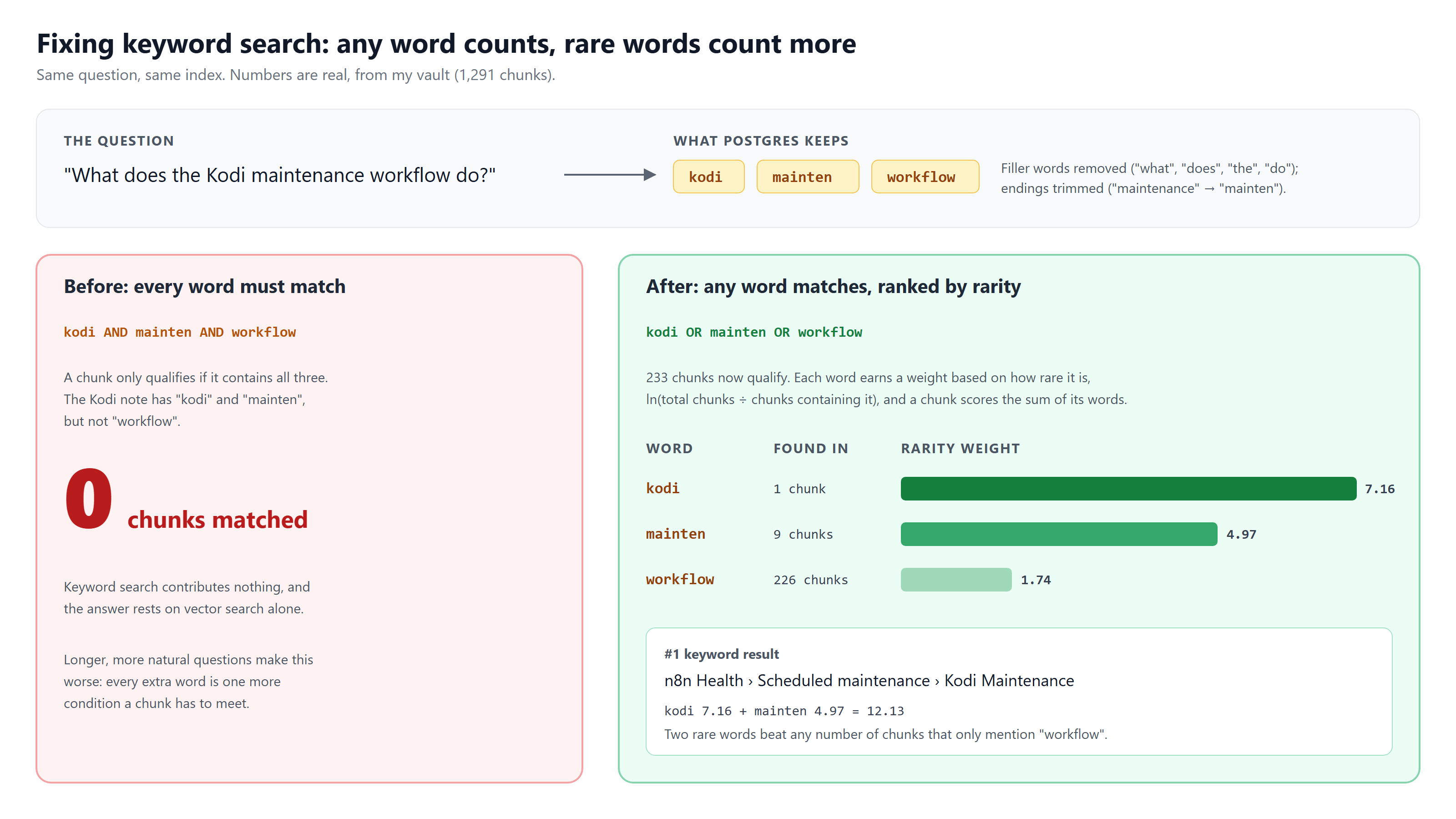
For this question, “kodi” appears in 1 chunk (weight 7.16), “mainten” in 9 (4.97) and “workflow” in 226 (1.74). The Kodi status note scores 7.16 + 4.97 = 12.13 and comes out on top, and no pile of “workflow” mentions can outvote it. The same logic is why a question like “what port is pgvector on?” leans on “pgvector” (15 chunks) far more than “port” (69 chunks).
If you’ve worked in search, you’ll recognize this as a simplified version of inverse document frequency, the idea behind classic ranking functions like BM25. It’s old technology. It’s also the difference between keyword search being a real partner to vector search and being dead weight.
Challenge 3: combining two rankings
Now there are two ranked lists, one by meaning and one by keywords, and they need to become one. The obvious approach, adding up their scores, doesn’t work: a vector similarity and a keyword weight are on completely different scales, and any formula that mixes them needs constant tuning.
The standard answer is reciprocal rank fusion (RRF), and it’s delightfully simple. Ignore the scores and use only the positions. Each chunk gets 1 ÷ (60 + its rank) from each list it appears in, and the totals are sorted.
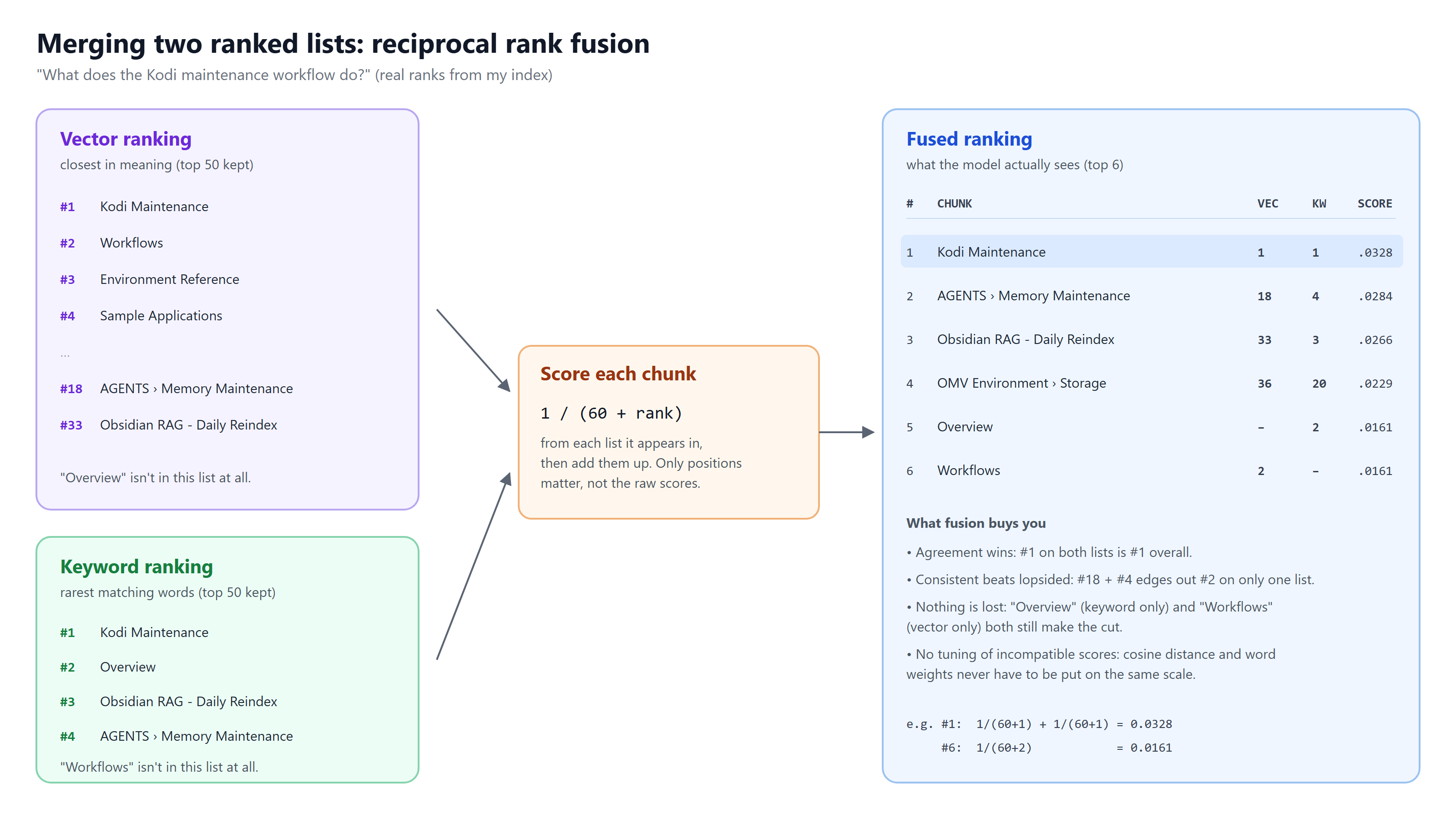
Three things fall out of that formula:
- Agreement wins. A chunk that’s #1 on both lists is #1 overall.
- Consistency beats a single strong showing. A chunk ranked #18 by meaning and #4 by keywords edges out one that’s #2 on a single list.
- Nothing is lost. A chunk that only keyword search found, or only vector search found, still makes the cut if it ranked well there. That’s exactly what rescues exact-value questions.
The whole thing (both searches, both rankings and the fusion) is a single SQL query that takes about 80 milliseconds.
Challenge 4: keeping it fresh without breaking it
An index is only useful if it matches the vault, and my vault changes all day because automations rewrite status notes constantly. A few safeguards took more thought than the search itself:
- Only reprocess what changed. Each note’s contents are fingerprinted, and the nightly run only re-chunks and re-embeds notes whose fingerprint changed. If I change how chunking works, a version number forces everything to be rebuilt.
- One bad note can’t sink the run. Each note is processed in its own transaction. If one fails, it’s rolled back and reported, its old chunks stay searchable, and the run carries on. The n8n flow then raises an alert listing whatever failed.
- An empty vault means something is wrong, not that everything was deleted. If the service ever sees zero notes while the index has hundreds (a failed mount, say), it refuses to run instead of dutifully deleting the entire index.
- Only one reindex at a time. A database lock makes a second run bow out politely instead of racing the first.
Challenge 5: working with a small local model
A small model running at home is fast and private, but it has a limited attention span and a tendency to improvise. The answers side has its own guardrails:
- A fixed budget. The top six chunks go into the prompt, capped at 9,000 characters. If they don’t fit, the lowest-ranked ones are dropped first.
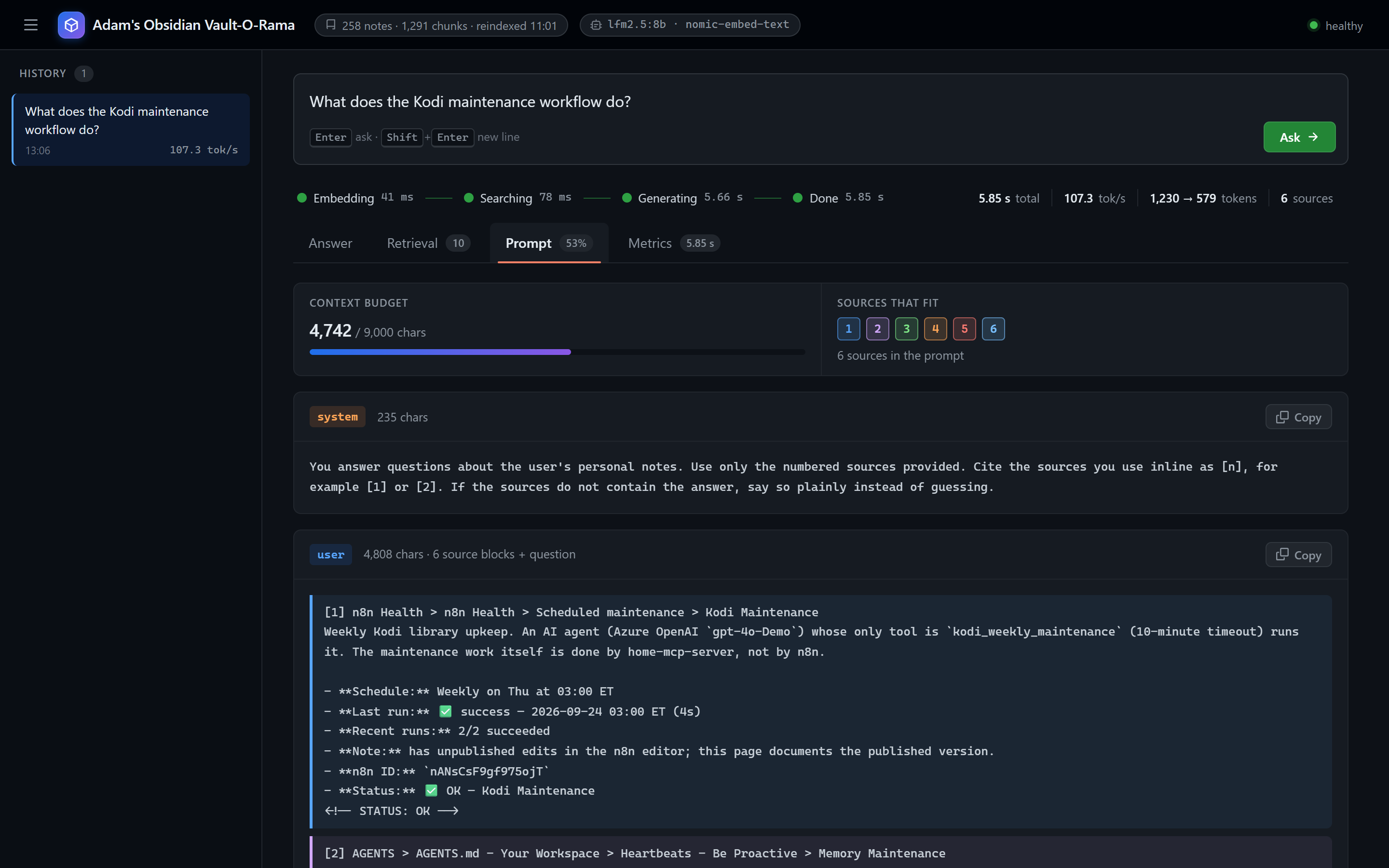
- Answer only from the sources. The instructions are blunt: use only the numbered sources, cite them inline as [n], and if the answer isn’t there, say so plainly instead of guessing.
- No retrieval, no model. If search finds nothing, the service says so without calling the model at all. There’s nothing for it to answer from.
The dashboard: making retrieval visible
The biggest lesson from building RAG is that you can’t improve what you can’t see. When an answer is wrong, is it because the right note wasn’t found, was found but ranked too low, or was found and the model ignored it? Without visibility, you’re guessing.
So I built a dashboard for it (I called it Vault-O-Rama). It’s served by the same service, with no extra setup, and it shows every step for every question.
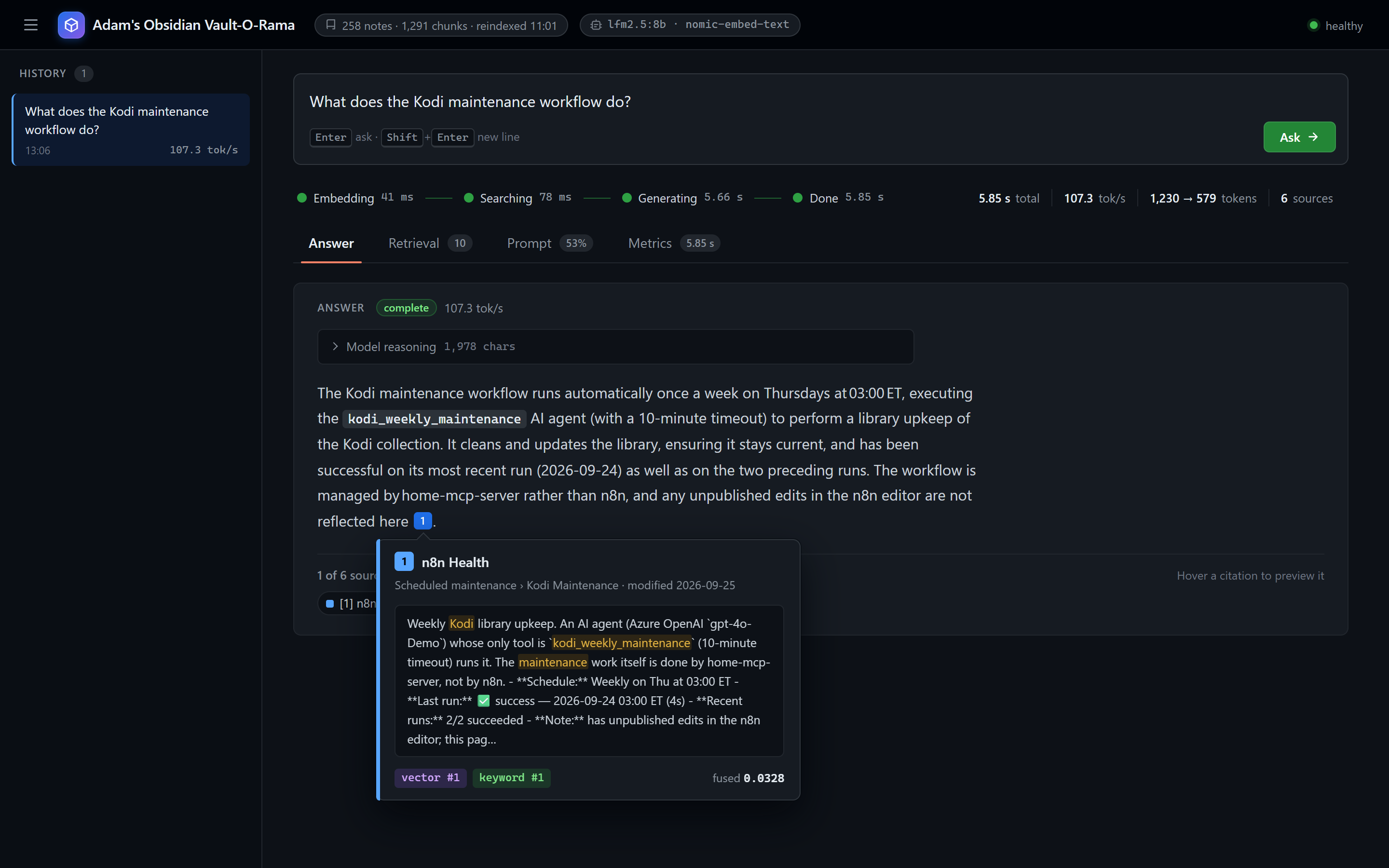
Answer. The answer streams in as it’s written, with numbered citations. Hover over one and a card shows exactly which chunk it came from, along with its rank in each search method.
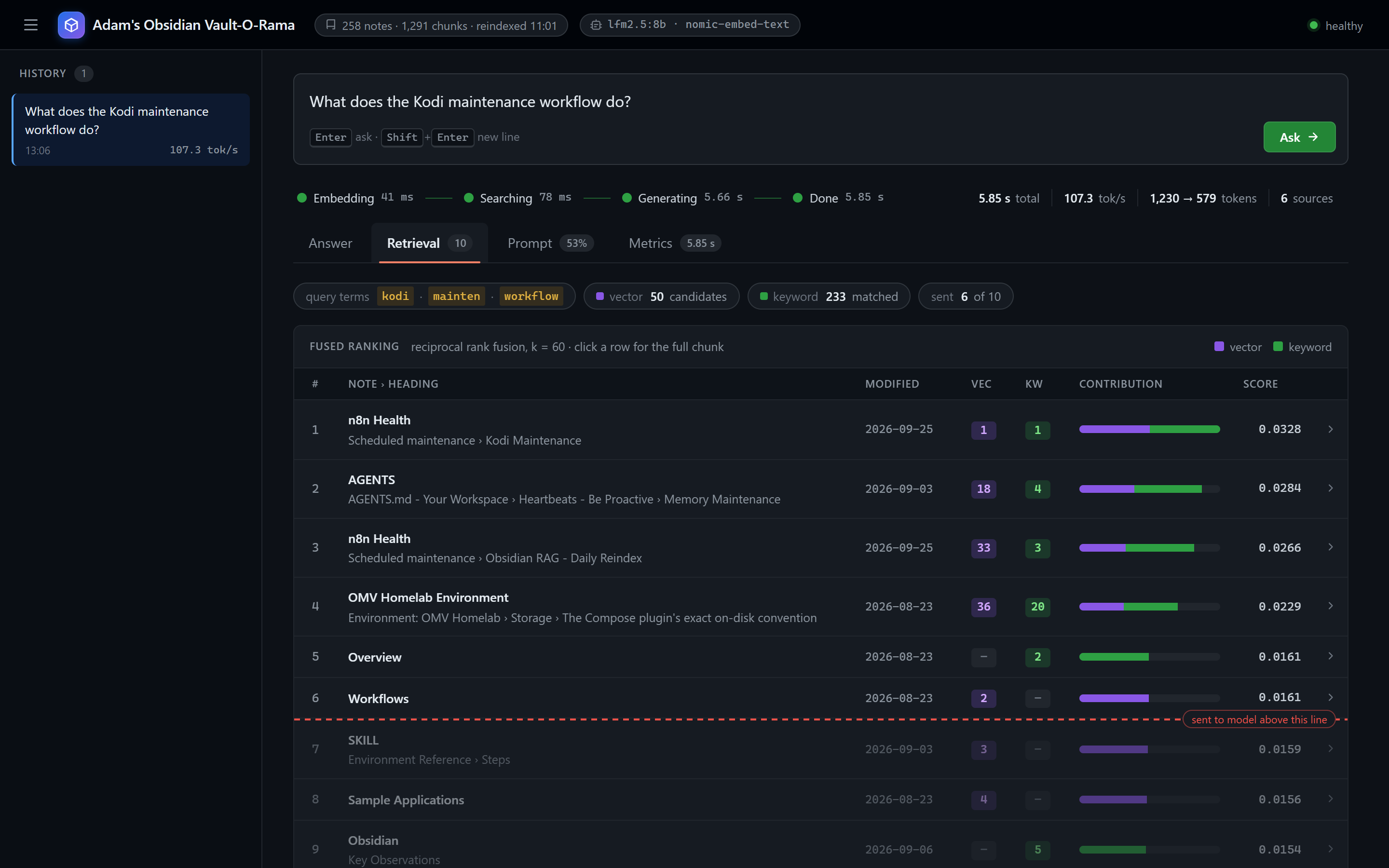
Retrieval. The fused ranking, with each chunk’s vector rank, keyword rank and final score side by side, plus the query terms keyword search actually looked for and how many chunks each method matched. A dashed line marks which chunks were actually sent to the model. This is the view that makes the keyword-versus-vector story visible: a “–” in either column means that method didn’t find the chunk at all.
Prompt. The exact text sent to the model: the instructions, every numbered source and the question. No mystery about what the model was working with.
Metrics. Where the time and tokens went. The pattern is always the same: finding the right notes takes a few dozen milliseconds, and the model writing the answer takes almost all of the rest. Here, retrieval took about 120 ms and writing took 5.4 seconds, or 92% of the run.
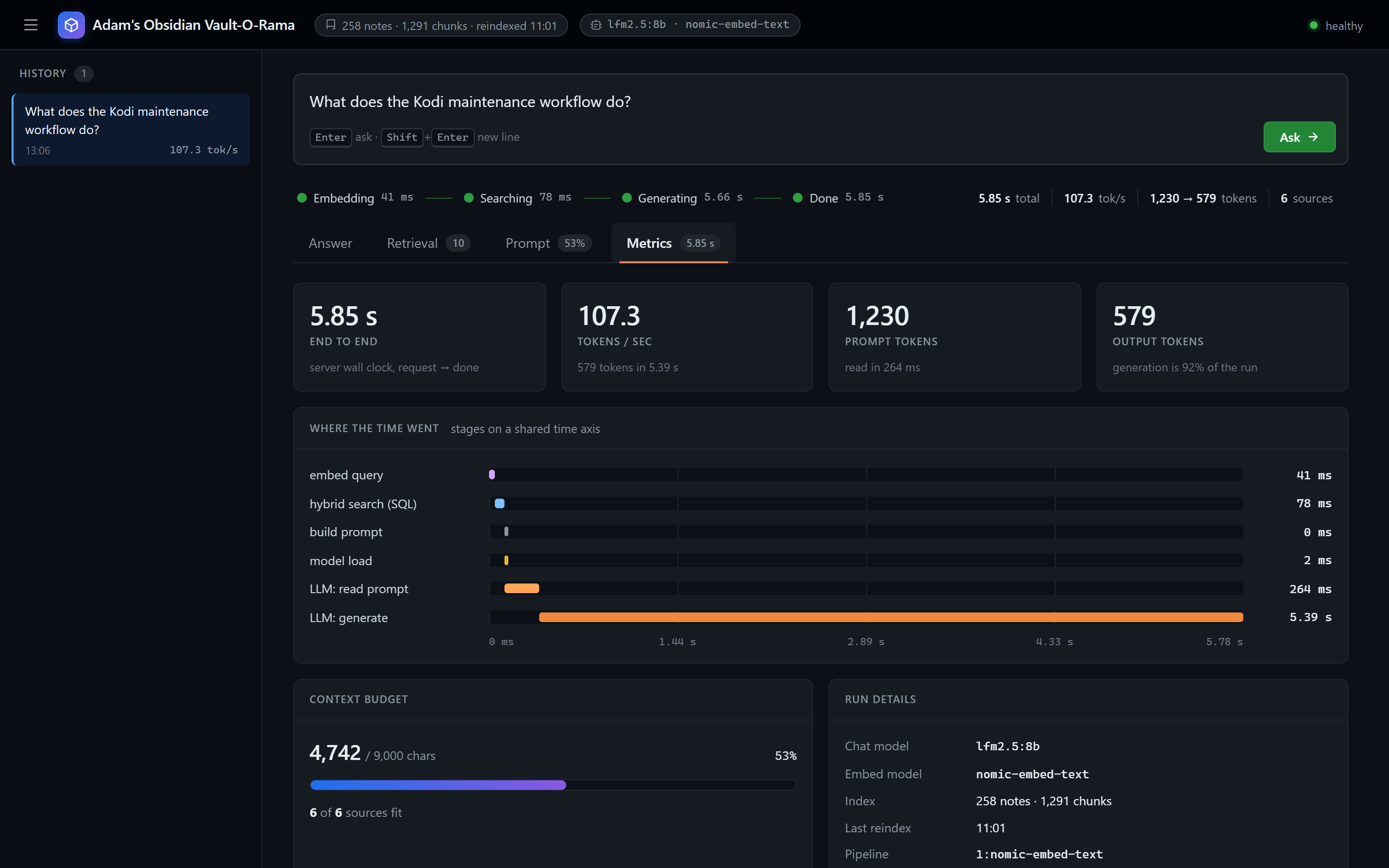
Every question is also sent as a trace to Langfuse, a self-hosted observability tool for AI applications, so I can look back at any past question in detail. And that tracing is written so that if Langfuse is down or misconfigured, questions still work. Monitoring should never be the reason the thing it monitors breaks.
What’s next
It works, but “it seems to give good answers” isn’t a measurement. Next:
- An evaluation set. About 20 real questions, each paired with the note that should answer it, and a script that scores how often the right note is retrieved. Then chunk size, the number of sources and the ranking can be tuned against a number instead of a feeling.
- Tools for my agents. Exposing search and ask through my MCP toolbox so my automations and AI agents can query the vault the same way I do.
If you’re building RAG over your own notes, my one piece of advice is this: don’t skip keyword search, and don’t trust its defaults. Vector search gets the attention, but in a vault full of ports, IDs and names, the old technique is what finds the exact thing you’re looking for, as long as it isn’t quietly requiring every word in your question.