How a folder of plain text files became the place where my home, my servers, my automations and my AI tools all meet
Most mornings, the first thing I check isn’t a dashboard. It’s a note.
A note says whether my home server is healthy, whether the local AI models are running, and whether any of my automations failed overnight. Other notes say the house was locked up at bedtime, which sensors have gone quiet, and whether the media library is behaving. None of those notes were written by me. They were written by automations that run on a schedule and drop what they find into my Obsidian vault.
Over time this became more than a status board. It became my home brain: one place where facts about my house and my homelab are collected, kept current and read back, by me, by other automations and by AI tools. This post walks through how it’s put together and, more importantly, what it gets me.
What I mean by a “home brain”
Obsidian is a note-taking app, but under the hood it’s just a folder of Markdown files. No database, no proprietary format, nothing locked away. That turns out to be the whole trick.
Because the notes are plain text:
- People can read them. I open Obsidian and see nicely formatted pages with tables and links.
- Automations can write them. Any script or workflow that can write a text file can update a note.
- AI can read them. Language models are very good at Markdown. A note written for me is also a note an AI assistant can understand without any translation.
So the vault becomes a shared memory. Automations write what they observe, and everything else reads from the same place instead of going back to the source every time.
The environment
The setup is a typical homelab, nothing exotic:
- A home server (I call it HAL) running OpenMediaVault with a stack of Docker containers: the automation engine, the notes vault, a media stack, backups and a handful of my own services.
- A separate AI box running local language models through Ollama, so a lot of AI work never leaves the house.
- Smart-home gear: a Hubitat hub with door, lock and water sensors, Hue lights, and Alexa speakers that can make announcements.
- The network and media stack: Wi-Fi gear, plus the apps that download and organize TV and movies.
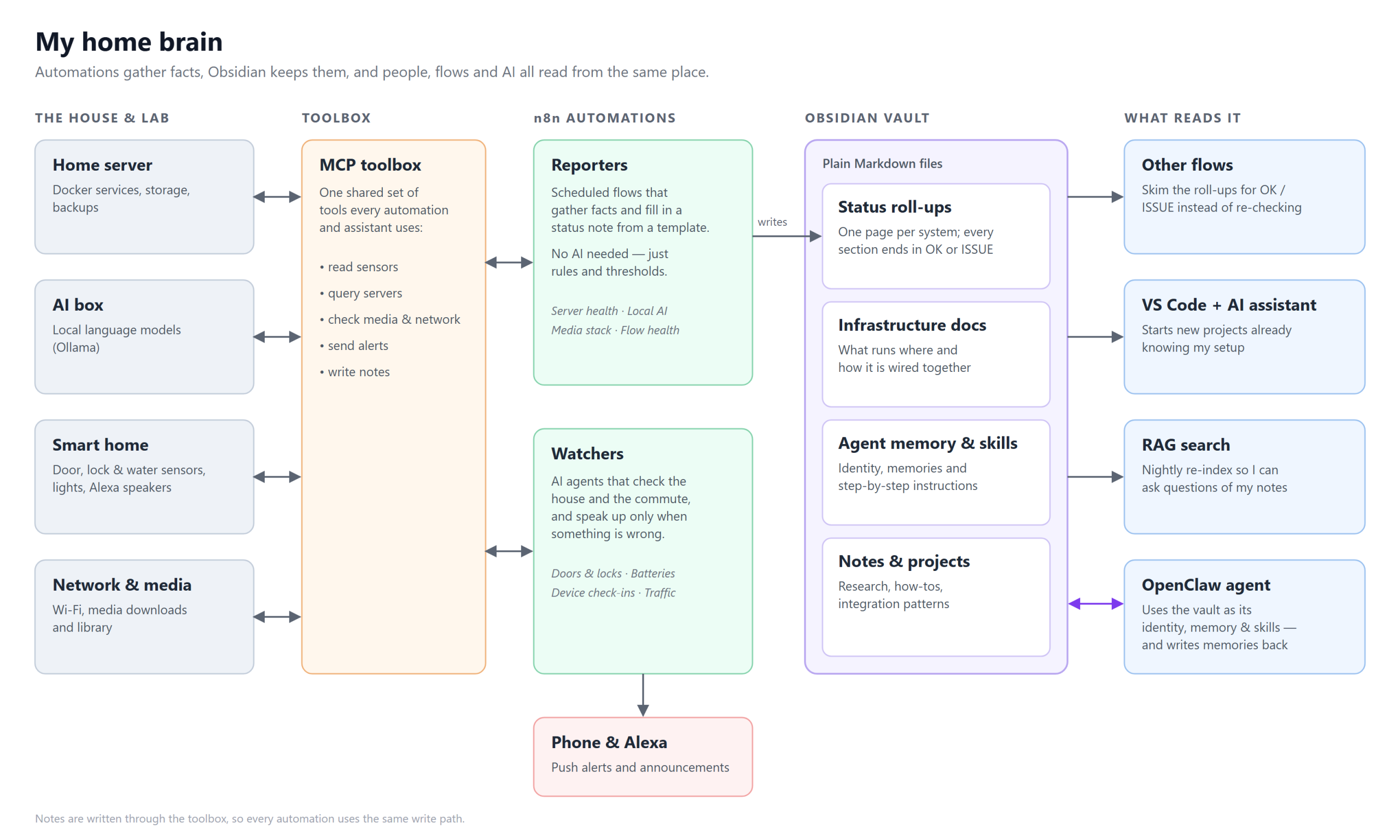
Sitting in the middle is a small service I built that I call the toolbox. It’s an MCP server, the emerging standard for giving AI assistants tools, and it exposes things like “check the door sensors”, “how full is the server?”, “send a push notification” and “write this note to the vault”. Every automation and every AI assistant uses the same toolbox, so there’s one way to do each thing rather than a dozen slightly different scripts.
How n8n feeds Obsidian
The automations run in n8n, a visual workflow tool you can self-host. I have a dozen or so flows on a schedule, and they fall into two groups.
Reporters: facts in, status note out
Reporters are the backbone of the home brain. Each one follows the same simple pattern:
- Read a template from the vault: a Markdown page with placeholders.
- Gather the facts through the toolbox: disk space, running containers, which AI models are loaded, what’s stuck in the download queue.
- Fill in the template and write the finished note back into the vault.
I have reporters for the server itself, the local AI hosts, the media stack, and even one that reports on n8n: every active flow, what it does, its schedule and whether its last run succeeded.
The most important design choice is that most reporters use no AI at all. “Is the disk more than 85% full?” is a rule, not a judgment call, and a rule gives the same answer every time. I only bring in a model where judgment actually adds something, like writing a short plain-English note about anything odd in the container list.
Every section of a status note ends with a tiny marker, either OK or ISSUE, tucked into an HTML comment so it disappears in Obsidian’s reading view. It makes every note machine-checkable. The marker turns out to matter more than anything else in the note.
Watchers: speak up only when something’s wrong
Watchers are small AI agents with a narrow job and a short list of tools:
- Is the house secure? At bedtime, check every door and lock sensor. If anything is open, send a push notification and announce it on the kitchen speaker.
- Are the sensors alive? Once a day, find devices that haven’t checked in for two days.
- Are the batteries OK? Flag any lock or door sensor below 25%.
- How’s the commute? Every morning, and on weekday afternoons, check traffic for a family member’s drive and alert only if there’s a real delay.
The rule for watchers is silence means everything’s fine. They don’t write a daily essay. They stay quiet until there’s something worth interrupting someone for.
What this gets me
Collecting data is the easy part. The value comes from what I can do once it’s all in one readable place.
1. Roll-ups: check once, read many times
Each reporter condenses a whole area (server health, sensor health, media, the automations themselves) into one status page. Anything else that needs to know “is everything OK?” doesn’t have to repeat the checks. It just skims the roll-ups.
A flow that wants to know whether anything needs attention doesn’t have to query ten systems. It can just search the status folder for ISSUE. My n8n roll-up goes one step further: the top of the page carries an overall status, and when something fails it includes an explicit “AI follow-up required” section listing exactly which run failed and why. That’s written as much for an AI assistant as for me.
This layering keeps each piece simple. The reporters know how to check things. Everything else only needs to know how to read.
2. Context for building software
When I start a new project, I point VS Code and my AI coding assistant at the vault.
It’s all there: what runs on which machine, how the services talk to each other, which ports and conventions I use, and notes on patterns I’ve already worked out, like the right way to call the toolbox from n8n. Instead of re-explaining my environment at the start of every session, the assistant reads the same notes I would. New projects start from “here’s how my setup works” rather than from a blank page, and the code it suggests fits the infrastructure I actually have.
The status notes help here too. If I’m building something that depends on the media stack or the AI box, the assistant can check whether those are healthy before we go chasing bugs in the code.
3. A foundation for RAG
Every night, a flow re-indexes the vault for search. Because the notes are clean Markdown, they’re ideal input for retrieval-augmented generation (RAG), where an AI answers questions by first finding the relevant notes and then reasoning over them.
That means questions like “when did the server last run low on disk?” or “how is the media stack wired?” can be answered from my own notes rather than from an AI’s general knowledge. That’s the subject of my next post, so I’ll leave the details there.
4. A home for an AI agent
I also run OpenClaw, a self-hosted AI agent framework, partly as a hands-on way to learn how agents really behave. My agent is called Jeeves, and the vault is its home.
Its personality, its instructions and what it knows about me are Markdown files at the root of the vault. Its memories are notes. Its skills, step-by-step instructions for tasks like checking the Docker containers, are notes too. When Jeeves learns something worth keeping, it writes it back into the vault, where I can read it, edit it or delete it.
That last part matters to me. An AI’s memory is usually a black box. Here it’s a folder I can open. And because Jeeves runs on a small local model, I’ve learned to lean on those written skills rather than letting it improvise. Small models follow clear instructions well and improvise poorly. The same notes that guide my other automations make the agent more reliable.
What’s next
The home brain started as a way to stop checking dashboards and ended up as the shared memory for everything else I build. The pattern is simple enough to borrow:
- Write facts to plain text on a schedule.
- Mark every section OK or ISSUE so machines can check it.
- Let everything else read the roll-ups instead of re-checking the source.
Next time, I’ll dig into the RAG side: turning this vault into something I can have a conversation with, and what it takes to make the answers trustworthy.