Teaching the Second Brain to Listen and Talk Back
A voice layer on top of the RAG pipeline — and why that’s most of the way to a real voice agent

Demo link: https://incidentsdemo.adamscave.net/
A previous article walked through the machinery behind a “second brain” built over about 8,000 US pipeline incident reports (public safety data from 2010 to today) plus a set of call transcripts, interviews and debriefs. Ask it a question — “What caused the 2010 Enbridge Line 6B rupture in Marshall, Michigan?”, “How many incidents happened in Texas in 2019?” — and it searches that data, reasons over only what it finds, and answers with a citation you can click through to the source. If the data doesn’t cover something, it says so instead of guessing.
That system has always worked by typing and reading. This piece covers what changed recently: you can now ask it out loud, and it talks back. We won’t re-cover the retrieval, redaction or citation machinery — that’s all unchanged, and it’s exactly what makes the voice layer trustworthy rather than just a gimmick. This article is about the new front end bolted onto it: a microphone in, a voice out, and everything in between.
1. Why this counts as “most of the way” to a voice agent
A voice agent, in the fullest sense, understands spoken language, reasons about it, and responds in kind — on a loop, with memory of the conversation. This system doesn’t yet hold a back-and-forth conversation or act on your behalf without a click. But it does the three things people actually mean when they say “voice agent”:
- Comprehension — it turns speech into text accurately enough to trust.
- Reasoning — the same retrieval-and-citation pipeline from the original article, unchanged, doing the actual thinking.
- Response — it turns the answer back into natural-sounding speech, as it’s being generated, not after the fact.
What’s missing is mostly interaction polish — see §7 — not the hard part. The hard part, trustworthy reasoning over real data, was already solved. Technically, the killer robot that I built is really a voice agent, even if you don’t want a t800 on the other end of a call (some video here).
2. Why voice at all
Typing is a fine interface at a desk. It’s a bad one on a plant floor, in a hard hat, with gloves on, standing next to equipment. The brief that drove this feature was simple: let someone ask a question out loud and get a spoken answer back, without touching a keyboard. Click a mic, talk, click again — the transcript appears where typed text would have, and it’s submitted exactly as if typed. A toggle turns on spoken answers, reading them aloud sentence by sentence as the text streams onto the screen.
Nothing about what gets answered changes. Voice is a new door into the same room.
3. Comprehension: turning speech into text
Speech-to-text runs through a local model first, with a cloud service as backup — the same philosophy as elsewhere in this project: prefer local, fail over gracefully, trace everything.
- A local Whisper service transcribes the recording. It’s fast (under two seconds for a five-second clip) and good at the kind of detail that matters here — report numbers, operator names.
- If that’s unreachable, a cloud speech service steps in automatically. It’s slightly weaker on exact numbers and jargon (“2010 0123” instead of “2010-0123”), which is precisely why local is tried first.
- If neither is available, the mic button simply shows as unavailable with a reason — the rest of the app works exactly as before.
An empty or failed transcription never submits a blank question; the person is told to try again, not left guessing why nothing happened.

The mic is listening for the prompt
4. Reasoning: nothing new, and that’s the point
Once the words land in the question box, they go through the same pipeline as a typed question: hybrid search, query refinement, counting detection, injection defenses, redaction, citations. A spoken question gets exactly the same trust guarantees a typed one does — because it’s not a different code path, it’s the same one.
This is deliberate and worth saying plainly: the voice layer adds no new reasoning of its own. It’s a front door, not a second opinion.
5. Response: speech that sounds like speech, not like markdown read aloud
Turning an answer into audio sounds simple until you try it on real output. Model answers contain headings, bullet points, citation brackets like [3], redaction placeholders, the occasional table. None of that should be read aloud as literal symbols.
A small text-cleaning step strips all of it down to what a person would actually say: headings and emphasis markers removed, citations like [3] dropped, a document id like hl:20100123 read out as “report 2010 0123,” a redaction placeholder read as “redacted,” tables and code blocks skipped entirely.
Speech is generated sentence by sentence as the answer streams, not after the whole answer finishes — so audio starts within about two seconds of the first sentence appearing, and plays in order with no awkward gaps. A reader can pick from four natural-sounding voices, plus one additional voice served from a machine on the local network rather than the cloud; that local voice is automatically greyed out, not broken, if its service is briefly unreachable.
That fifth voice is Megatron — not a cloud voice at all, but a custom voice model that I trained from scratch on dozens of clips pulled from the original 1980s animated show. It’s a bit of fun listed deliberately last in the voice picker, but it’s also a real demonstration that the voice layer isn’t locked to one vendor: any voice you can get enough clean audio for can sit alongside the commercial options, served from a machine on the local network instead of the cloud. I used free LLMs in this demonstration because…well.. they are free. If I gave you a login, you would have the option to select OpenAI voices – they are worlds better than the free models.
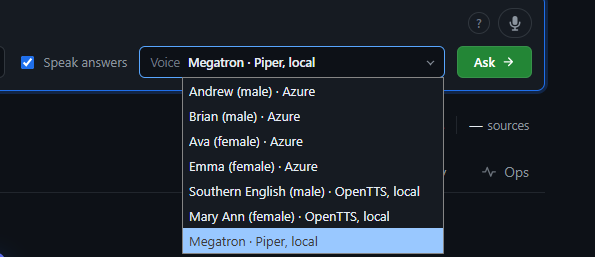
The frontier models are only available for logged in users – sorry about that
6. Trust, carried over rather than rebuilt
Voice didn’t require a new trust story — it inherited the existing one:
- Redaction already happened at index time, so there’s nothing extra to scrub before an answer is spoken aloud; what’s safe to show on screen is safe to say out loud.
- Audio is never stored. A recording lives in memory for the duration of one call and is discarded — never written to disk, never kept alongside the transcript.
- Every transcription and every spoken sentence is traced, the same way every search and every answer already is, so a spoken exchange shows up in the same operational view as a typed one, not in a separate, harder-to-audit silo.
7. What would make this a real voice agent
Being honest about the gap matters more than claiming to have closed it. Left out, on purpose, for now:
- No open-ended conversation. Each question is a discrete ask-and-answer; there’s no “and what about last year?” follow-up without clicking again.
- No wake word or hands-free trigger. You still click to start and stop recording.
- No live partial transcript. You see the final text, not words appearing as you speak.
- English only, by design, not by limitation of the underlying services.
None of these are hard problems the way trustworthy retrieval was (although having done this in the terminator bot, it is still trickier than it sounds). They’re the next layer of polish, once the comprehension-reasoning-response loop has been proven out in real use.
8. Try it yourself
Demo Link: https://incidentsdemo.adamscave.net/
Using the mic:
- Click the microphone icon next to the question box. The first time, your browser will ask for microphone permission — allow it.
- The icon turns red and pulses while recording, with a running timer. Ask your question out loud.
- Click the mic again to stop. (Or press Esc to cancel and discard the recording instead.)
- The transcript appears in the question box automatically and the question submits itself — no need to also hit Enter.
If the mic is greyed out, hover over it: it’ll tell you why (page isn’t secure/HTTPS, permission was denied, or the speech-to-text service is temporarily unreachable).
Using spoken answers:
- Turn on the “Speak answers” toggle near the question box.
- Pick a voice from the dropdown that appears — Andrew, Brian, Ava, Emma, or Megatron.
- Ask a question, by voice or by typing. The chosen voice starts reading the answer aloud a sentence or two after it starts appearing on screen.
- A Stop button appears in the query bar while audio is playing, if you want to cut it off early.
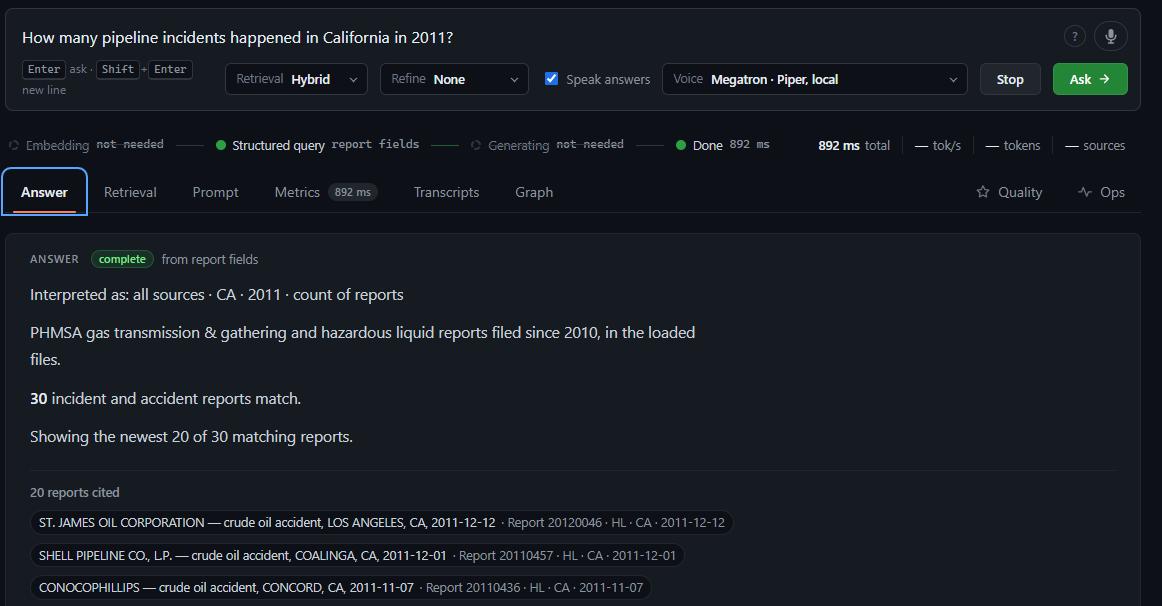
Sample prompts to try out loud:
- “What caused the 2010 Enbridge Line 6B rupture in Marshall, Michigan?”
- “How many incidents happened in Texas in 2019?”
- “What’s the most common cause of pipeline corrosion incidents?”
- “Who should I contact about a gas distribution spill?”
- “Were there any incidents involving Buckeye Partners?”
- “Summarize the call transcript about the valve failure at the Ohio facility.”
Ask the same question twice — once typed, once spoken — and you’ll get the same answer both times. That’s the point: voice changed how the question got in and how the answer got out, not what the system actually did with it.
The checklist
- Reuse the reasoning you already trust. Voice is a new door, not a new brain.
- Prefer local, fail over to cloud, trace both — the same philosophy already used elsewhere in the pipeline.
- Never read markdown aloud. Clean the text for the ear, not just the eye.
- Speak as you think, sentence by sentence, not after the whole answer is ready.
- Inherit your privacy guarantees, don’t rebuild them for a new interface.


