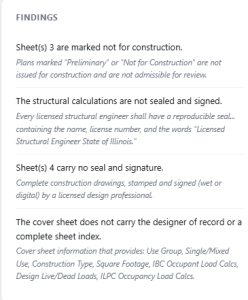
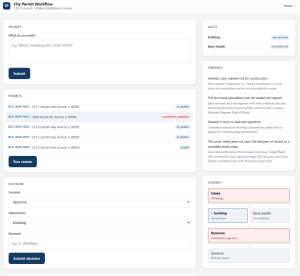
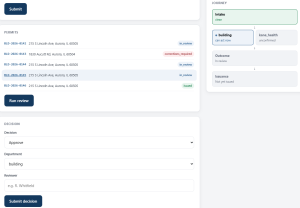
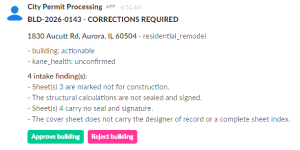
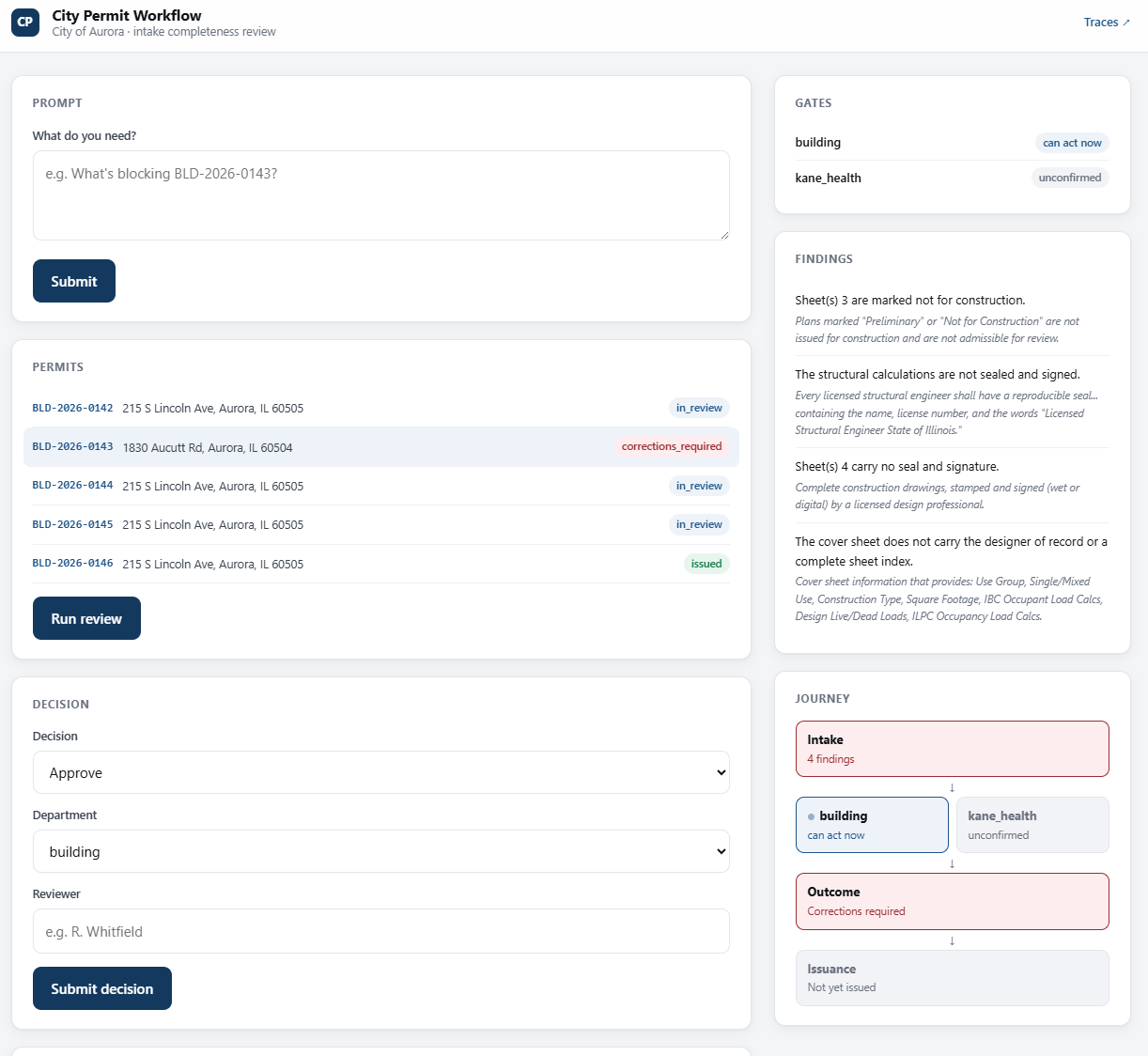
“Agentic AI” gets used to describe everything from a single chatbot with a plugin to a fully autonomous back office. This demo is representative of applications that I create at the day job: a permit review workflow modeled on how a city building department actually processes a construction permit, end to end. Don’t get me wrong – I make them for home life as well (a future post will show my fantasy football agents :-). This post walks through what I built, what it checks, and the one lesson that mattered most: the more consequential the decision, the less I wanted a language model anywhere near making it. To be upfront about it: this isn’t connected to any real city’s permitting system, and the permits in it aren’t real applications. The plan sets are generated documents, the applicants are invented, and the addresses were picked for plausibility, not accuracy. What is real is the process shape. I researched how an actual city’s building and permits division is structured — which departments review what, how an outside agency like a county health department fits in, and where a permit can get stuck — before writing a line of code. Then I deliberately narrowed the scope to one permit type and one external agency, so the system stays legible instead of sprawling to cover every case a real department handles. Every submittal in this system arrives as a plan set — a multi-sheet PDF: a cover sheet, then architectural, structural, foundation, life-safety, electrical, mechanical, and plumbing sheets. Before anything gets decided, the system opens that document and reads it, sheet by sheet, against the same checklist a plans examiner would use for an intake completeness review: None of this is a model reading the document and forming an impression. It’s a direct extraction of the PDF’s own text layer, checked against explicit criteria — the same finding comes back every time for the same document, which is exactly what an intake check has to guarantee. A submittal that fails shows up as a specific, itemized list, not a vague rejection: Four separate, actionable findings — not “your submission was incomplete.” Once intake is checked, the permit moves into department review, and this is where the workflow stops looking like a checklist and starts looking like an actual process: A reviewer can see exactly where a given permit sits in that path at a glance: which department is holding things up, whether it’s stuck on an outside agency’s response, or whether it’s genuinely ready to move. Status doesn’t require clicking through a UI to find, either. A plain-language prompt — “What’s blocking BLD-2026-0143?” — routes to the same underlying facts as the visual view and answers directly, so checking on a permit is as fast as asking about it. When a department’s status changes, that same fact reaches a reviewer wherever they’re already working — in this case, a message in Slack (I could have used Teams as well) with the specific findings attached and the decision one click away: Here’s the part that surprised people when I described this project: out of the entire workflow, exactly one step involves a language model at all. After the document scan and the department checks are complete, a model is handed those already-computed facts and asked to write them up — a short, plain-English summary for whoever’s reading the permit next. It doesn’t see the raw document, and it isn’t asked to judge anything. The facts and the verdict already exist before it’s called. If that step fails outright, the permit still has its correct status and its correct findings. It’s simply missing a paragraph of prose, never a wrong decision. That’s the opposite of how a lot of “agentic AI” demos are built, where a model is put in charge of the whole loop and asked to reason its way to an outcome. It’s also, I’d argue, the only version of this that a city (or any organization with real compliance stakes) could actually trust in production: every checkable fact is checked the same deterministic way every time, and the one place uncertainty is allowed to live — the model — is the one place where being wrong costs you a poorly worded sentence, not a wrongly issued permit. The pattern I’d carry into any future version of this — including a planned port onto Microsoft Copilot Studio, where a conversational front end would sit on top of the same rules engine and API this prototype already has — is the division of labor itself: That division of labor is also what makes a platform port tractable. None of the actual logic needs to be rewritten to move to a new front end — it just needs one. If there’s one thing worth taking from this project into your own agentic engineering work, it’s this: figure out which decisions in your workflow need to be the same every time, build those as rules you can point to, and only then decide where a model earns a seat at the table.What This Is (and Isn’t)
The First Job: Reading the Document, the Same Way Every Time
The Path a Permit Actually Takes
Where the Model Actually Fits
The Takeaway
Fun With Agentic AI



Related Blogs
