
Building a legal knowledge system without being a lawyer: one public data set, three kinds of readers, and why the process is the same in any industry
There is one question that will almost always make a consultant’s eyes roll: “Have you worked in our industry?”. In my thirty years, I have worked in dozens of industries. I learned more about making glass soda bottles, motor homes, healthcare, etc, than I ever thought possible. Unless someone brought up the industry, I honestly never thought about it. I recently did not win a project, and it really bothered me. The potential client loved us, our approach, and our bid. They didn’t choose us because they thought we didn’t have enough experience in their inudustry. The irony is that the company had found us after having a failed project with another company. I don’t know this for sure, but I would assume that company was picked because they had experience in the industry. Never mind that every single AI / Data Platform project that I have done was done on time and on budget to the client’s satisfaction – having assembled data and processes in THAT industry mattered more than competency, apparently.
I then came up with the idea for a project: what if I went through the process in two different industries to see how the process changed? I decided to pick the legal industry because this is where I hear the “have you worked in this industry before” question the most. Earlier this year, I had started down a similar path and then lost track of it as work and life got in the way. I had interviewed a colleague from our legal department in the hopes of shaping an offering specifcally targeted to law firms. I treated those meetings as requirements and started again on the project to build a knowledge management system that is specific to law. This is something that I have built numerous times for external clients, and it is something that I use extensively for personal use. I had also recently created a live demo of a pipeline incident knowledge management system that is representative of work that I have done for clients – in the demo I compare the two systems. My goal was simple: how much different was it to to make a system for lawyers than it is for another industry? I have done AI and data platform work for law firms, but it was often more about training their IT staff on AI concepts or helping them ingest data. I was familiar most of the terms and concepts, but I was rusty.
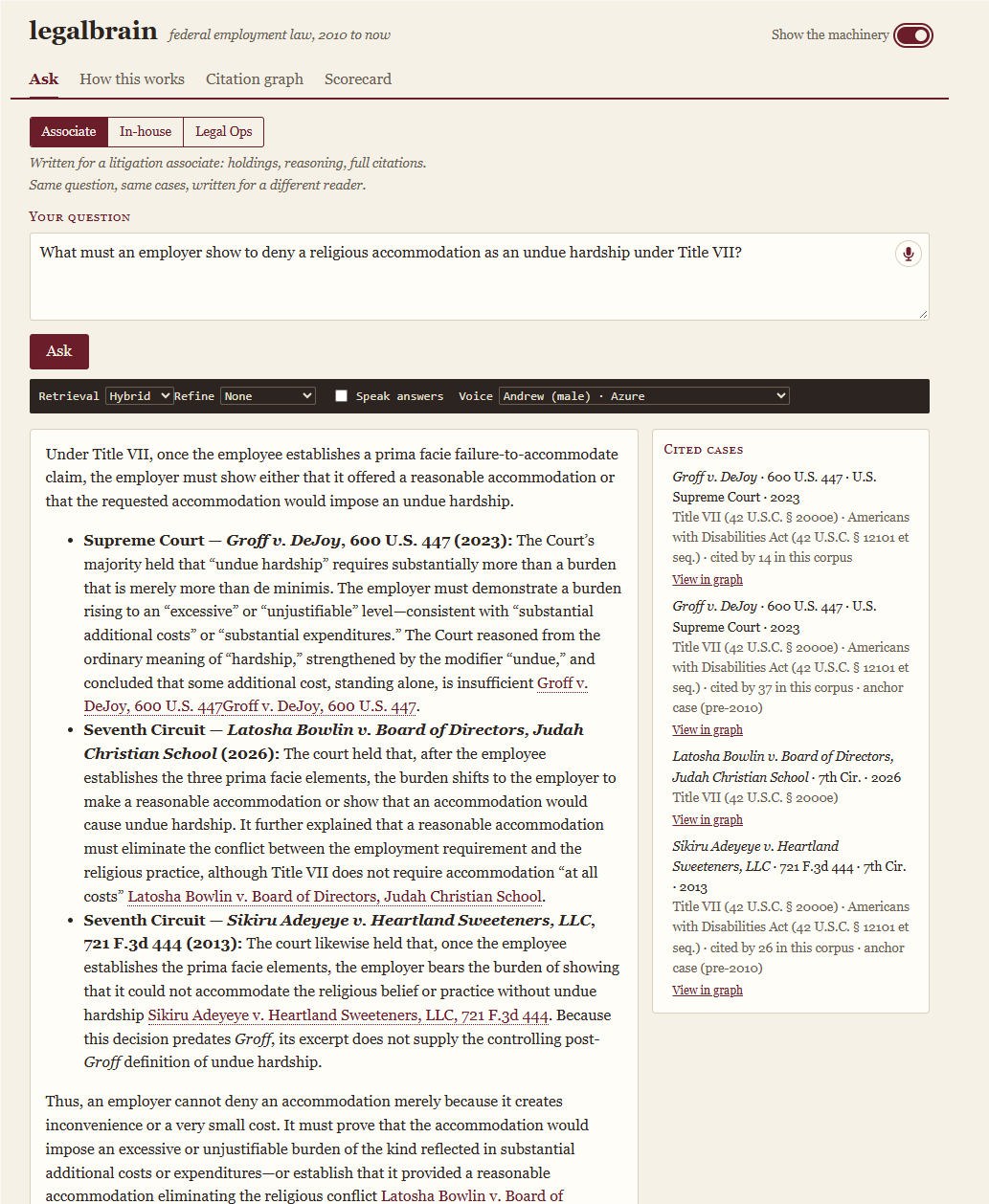
A few weeks ago I built a research assistant over about 25,000 federal court opinions: every employment-law decision from the US Courts of Appeals and the Supreme Court since 2010, plus the older landmark cases that those decisions keep citing. You can ask it things like “What must an employer show to deny a religious accommodation as an undue hardship?” and get a plain answer with the cases behind it. It will not cite a case that is not in the data.
At a high level this is a knowledge system: it turns a pile of documents into knowledge someone can use, meaning what the law says, which cases support it, and what the record cannot tell you. I am not a lawyer, and the point of the exercise was to test an idea I keep coming back to: building a knowledge system takes knowledge-system skills, not deep expertise in the subject. The vocabulary changes from one industry to the next. The work does not. Here is how it went, in three parts: who it is for, how I prepared the data, and why I think the process travels.
(It is a research aid built on public data. It is not legal advice, I didn’t stay at a Holiday Inn last night, and the demo says so on every answer.)
1. Start with the people, not the technology
Before I touched any data I asked the question I ask on every project: how do these people actually work, and what do they need to walk away with?
This project was not for an external client, but I approached it the way I would approach one. I interviewed a colleague about how they work, and the three-reader approach came out of those conversations. Legal work is not one job, and this demo targets three roles that read the same case law for very different reasons.
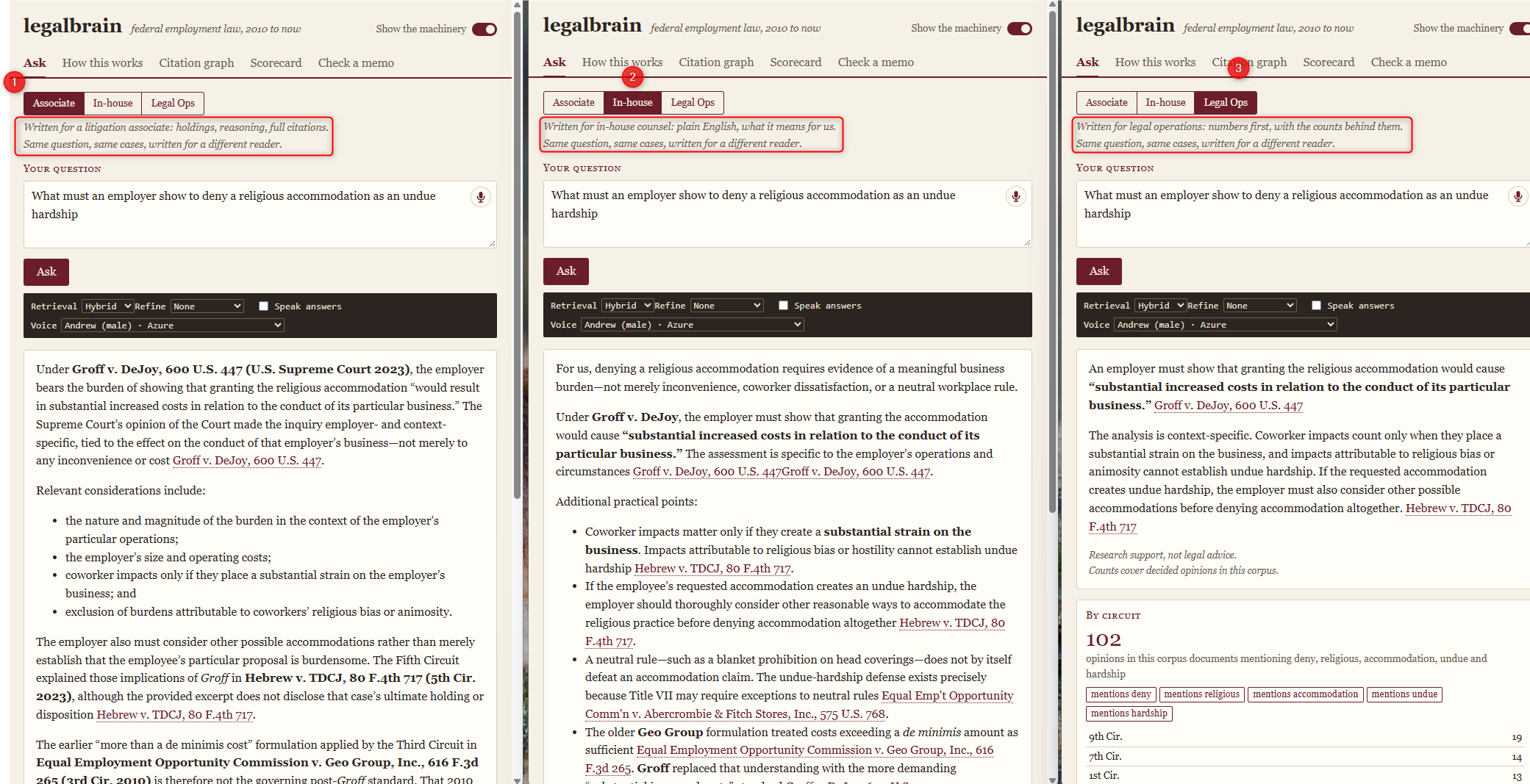
1. The litigation associate needs precision. For every case: the holding, the court’s reasoning, the court and the year, and whether it is the majority speaking. They will check every citation, so every citation has to be right.
2. In-house counsel needs a decision. They want it in plain English, framed as “what this means for us,” with the risk stated as likely or unlikely, and a short list of takeaways they can forward to a manager.
3. The legal operations analyst needs numbers. How many opinions on this topic, from which circuits, in which years? Lead with the count, and show the table behind it.
The same question gives three different answers, built from the same cases. Ask about religious accommodation and the associate (1) gets Groff v. DeJoy with its holding and reasoning. In-house counsel (2) gets the practical reading, that since 2023 an employer cannot refuse just because an accommodation costs a little, plus takeaways. Operations (3) gets the count of opinions that cite Groff, by circuit. The numbered markers in the screenshot below match these three.
None of that required a legal degree. It required a conversation, and a willingness to design the output around the reader instead of around the data.
2. Cleaning up the data
The raw material is a public bulk download from CourtListener: roughly 10 million court opinions from every court in the country, about 55 GB for the opinion text alone (it took 6 hours to ingest into my self-hosted database!). Most of it is irrelevant to this question, and some of it is messy. Preparing it is most of the work, and as a data scientist, I actually enjoy this part of the process.
I think of it as a funnel.
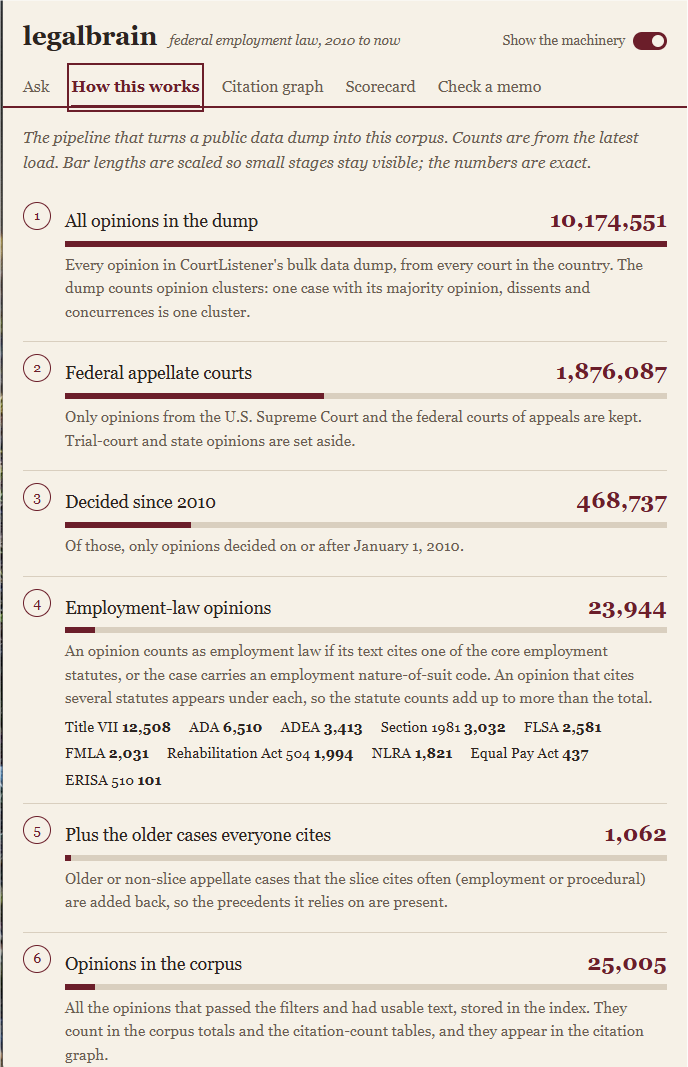
- 10.2 million opinions in the full download.
- 1.9 million from the federal appeals courts and the Supreme Court. That was the scope I chose, and the first big cut.
- 469,000 decided since 2010.
- 23,944 about employment law. The labels in the data were not enough to find these: in the sample I checked, only about one docket in fourteen carried a subject code. So the system reads the opinion text and looks for the core statutes by name and citation: Title VII, the ADA, the age and wage laws, family leave, and a few more.
- 1,062 older landmark cases added back in, because newer opinions keep citing them. A recent decision about hostile work environments is much easier to understand beside the 1998 case it leans on.
- 25,005 documents in the finished collection. Of those, 10,999 (the published opinions plus those landmark cases) are split into about half a million searchable passages. Unpublished opinions are counted and visible, but never retrieved to answer a question.
Along the way the pipeline deals with the things real data always has:
- The same case stored twice. Some opinions appear under two record numbers. Left alone, a case would cite itself, or fill two of the eight slots in a list.
- Dangling references. Records that point at a case, docket or court that is missing from the download. The pipeline logs and skips them instead of guessing.
- Missing or unusable text. A case with no readable text cannot be searched, so it is counted and left out.
- Names. “Jeff Dye v. Office of the Racing Commission” and “Dye v. Office of the Racing Comm’n” are the same case. Lawyers shorten names constantly, so matching names loosely, but not so loosely that an invented case slips through, took real care.
Relationships are the other half
Preparing the records is the first half. The second is the relationships between them, and in law the key relationship is the citation: this opinion cites that one.
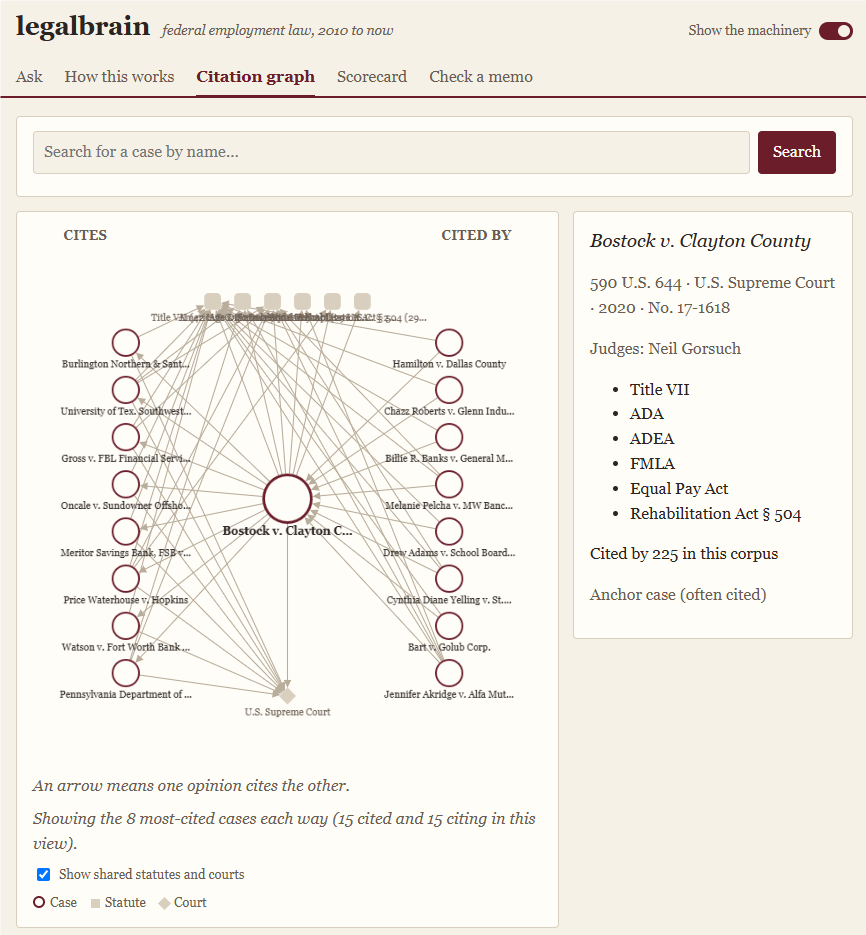
Once the links are in the data, several things come almost for free. Landmark cases rise to the top because many later cases cite them. Each case shows “cited by 37 cases in this corpus.” And the app can draw a case’s neighbourhood: what it cites, and what cites it.
Knowing what the data cannot answer
The last piece of preparation was deciding what the system should refuse. Court opinions say nothing about settlements, because a settled case leaves no opinion. They do not record how long a case took, or which law firms were involved. So when you ask “What is the median settlement in Title VII cases?” the answer is a plain “This corpus can’t answer that,” with suggestions for questions it can answer. That is a feature. In a legal setting a confident guess is the worst thing a system can give you.
3. Guardrails and measurement
Two rules run through the whole system.
Never cite a case that is not in the data. Every case name in an answer is checked against the collection. A name that cannot be found is struck out and labelled, and the rest of the answer stays.
Measure it. I wrote about 45 test questions with known answers, checked against the real data, and I score the system on five things: whether search finds the right case, whether every claim is backed by the cited passages, whether it declines what it cannot answer, whether counts are exactly right, and whether each reader’s style is followed. The current numbers are 0.93, 0.90, 1.00, 1.00 and 0.87, and the app shows them on its own Scorecard page.
Testing taught me three things worth passing on:
- The first number is usually bad. Search found the right case 63% of the time at first. The fix was to rank whole cases instead of single passages, because the landmark case was being crowded out by hundreds of later opinions that quote it. After that change it was 93%.
- Check the checker. A small local model scored perfectly on my first quality check, until I tested the judge itself against hand-marked examples and found it agreed with me only half the time. Once the judge was reliable, the same local model’s answers failed most checks (0.20 on faithfulness), and a larger hosted model passed (0.90). Once I switched from the local Ollama model to the cloud-hosted frontier model, the accuracy snapped into place.
4. The same process, in any industry
Here is the claim I set out to test. I have built a system like this for pipeline incident reports, and now for court opinions. The subject matter could hardly be more different, and the steps were the same:
- Ask how people work and what the output must be. Who reads this, what do they do next, and what does a good answer look like to them? Everything else follows from the answers.
- Prepare the data. Decide what is in scope, find the records that matter, remove duplicates and broken references, and be honest about what is missing.
- Define the relationships. Which things link to which: cases to the cases they cite, incidents to operators and states, tickets to customers. This is where “domain knowledge” actually lives in the system.
- Decide what it must refuse. Know what the data cannot support and say so, plainly.
- Measure it, and keep measuring. Write questions with known answers before you trust the answers.
One thing never changed after the data was loaded: the data itself. Every improvement after that, from better ranking and faster search to the citation check, the three readers and the memo checker, changed how the system searches the data and presents it, not the data. The domain work happens once, in preparing the data and its relationships; everything after is search and presentation on top of it.
Every industry has its own nuances, and every project has its own surprises. In this one it was the same opinion filed under two numbers, and lawyers shortening case names. I do not want to wave that away. But after the conversations with the user, the domain knowledge I needed came down to two things: getting the data ready, and defining the relationships inside it. That is why I think anyone who is good at this work in one industry can be good at it in another, provided they start by listening to the people who will use it. The approach and process matter more, and they travel across industries.
What is next
The demo answers questions, shows its sources, and measures itself. Since then I have added a citation checker for a pasted memo: paste a draft, and every case citation comes back labelled. It is either found, paired with the wrong case, missing where it should be, or outside what the collection covers. That is the same data and the same guardrail, pointed at a new job.
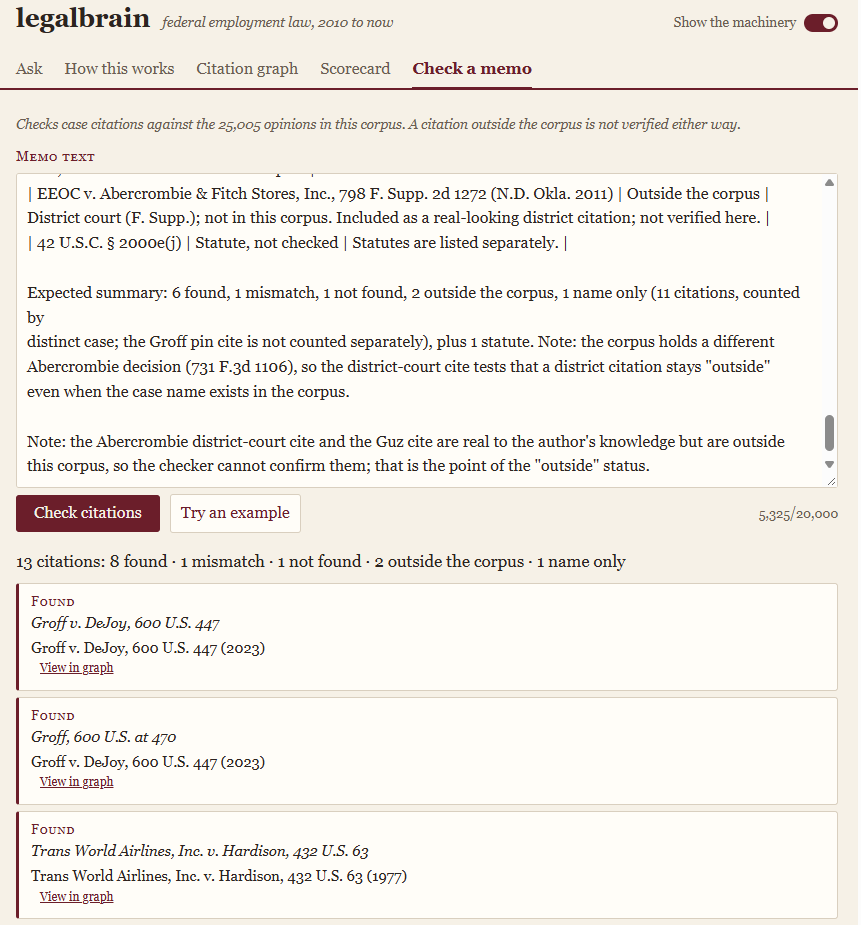
This is still a work in progress – next on the list is checking citations outside the collection against a public citation service, so “outside” can become “verified”.
Source data: CourtListener (Free Law Project) bulk data, public domain court opinions.


