I decided to take on yet another course as I wanted to learn something about Appcelerator :-).
My Notes: https://docs.google.com/document/d/19V_WQVvQyHNixh3zqhPpyBthaSR5Cy_6lc45tHdz17M/edit?usp=sharing
Course URL: https://app.pluralsight.com/library/courses/cross-platform-native-apps-appcelerator-studio-alloy/table-of-contents
Duration: 5 hours and 28 minutes (!)
Problems I encountered
#1: NPM was a newer version
The installer was smart enough to know that npm was newer. It wasn’t smart enough to allow the installation to be marked as completed. I ended up uninstalling node.
#2 Various complaints about SDKs
I am still not completely sure what happened here. My solution was to download Android Studio and have it manage the sdk installation (make sure you point it to the same folder that appcelerator is looking at). Also, in SDK manager be sure to check “Package” so that you can see exactly which images are installed.
#3. warning: quick boot/snapshots not supported on this machine
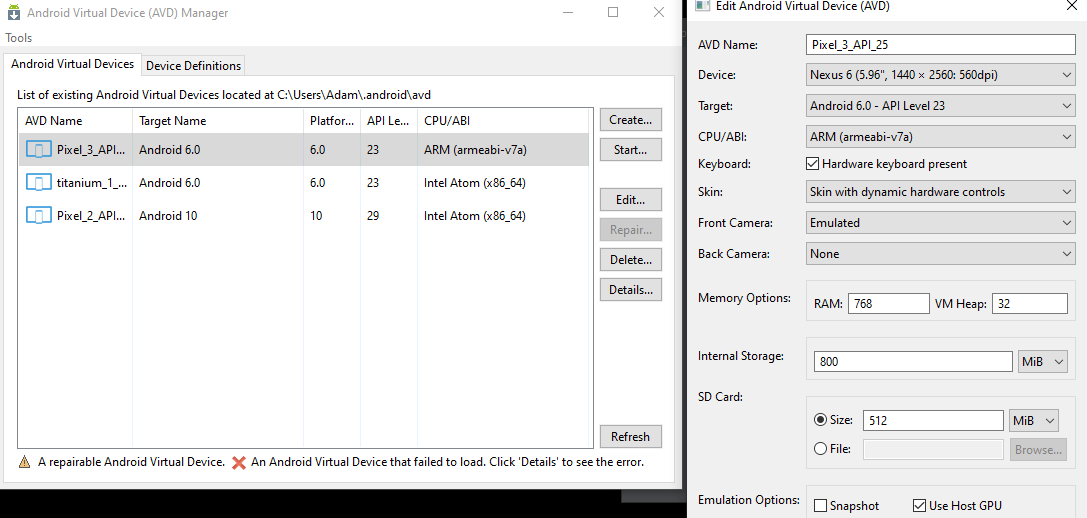
After hours of working around the other errors I hit this error. I saw several posts that said that this was the result of my cpu not being compatible with some of the emulation images. In my case the solution was to go to an arm-based setup.
Alternatively, if you have a more recent Intel processor it looks like the issue is related to not having hyper-v installed and enabled. I am still playing with this.